Shopify is one of the largest ecommerce platforms - but is it worth it for your business? Find out in this comprehensive guide.
Key takeaways
- Shopify provides an all-in-one ecommerce solution with built-in tools for inventory, payments, shipping, and multichannel selling.
- The platform scales from beginner-friendly drag-and-drop store building to advanced automation workflows and AI-powered features.
- Shopify's ecosystem of 13,000+ apps and partner network enables extensive customization as your business grows.
More and more people are looking to ecommerce as a way to ditch their traditional 9-to-5 and make money from home. If you’ve been on the hunt for the best option to make those daydreams a reality by selling online, you’ve certainly heard about Shopify.
As one of the most well-known names in commerce, with nearly 7 million live stores worldwide, Shopify promises to be a one-stop shop for virtually any type of business owner.
It has tools and features that cater to every stage of growth, from startup solopreneurs to billion-dollar global corporations. It also has a massive ecosystem of apps, integrations, tools, and partners.
On the quest for your next best move, it’s natural to try and answer the question: Is Shopify really worth it?
In this article, we’ll take a deep dive into that question. We’ll look at Shopify’s features, capabilities, pricing, user experience, and overall performance.
We’ll also compare it to some of the top contenders, like other ecommerce platforms and online marketplaces.
How does Shopify work?
Shopify is a powerful ecommerce platform designed to help businesses of all sizes build, manage, and grow their stores, both online and offline. Whether you’re selling a few handmade goods or managing a large-scale international inventory, the Shopify platform and ecosystem can help streamline the process.
Let’s explore some of the highlights.
Core functionality
Shopify centers around an intuitive store builder with customizable themes, which helps you to create a professional-looking website without coding skills or formal training. But it’s a lot more than a website builder. The platform has built-in features for things like:
- Inventory management
- Customer data management
- Payment processing
- Shipping
- Order tracking
- Financial management
- Performance analytics
- Marketing campaigns
- Safety and security
We’ll dive deeper into these in the “Shopify’s features and tools” section.
Shopify App Store and ecosystem
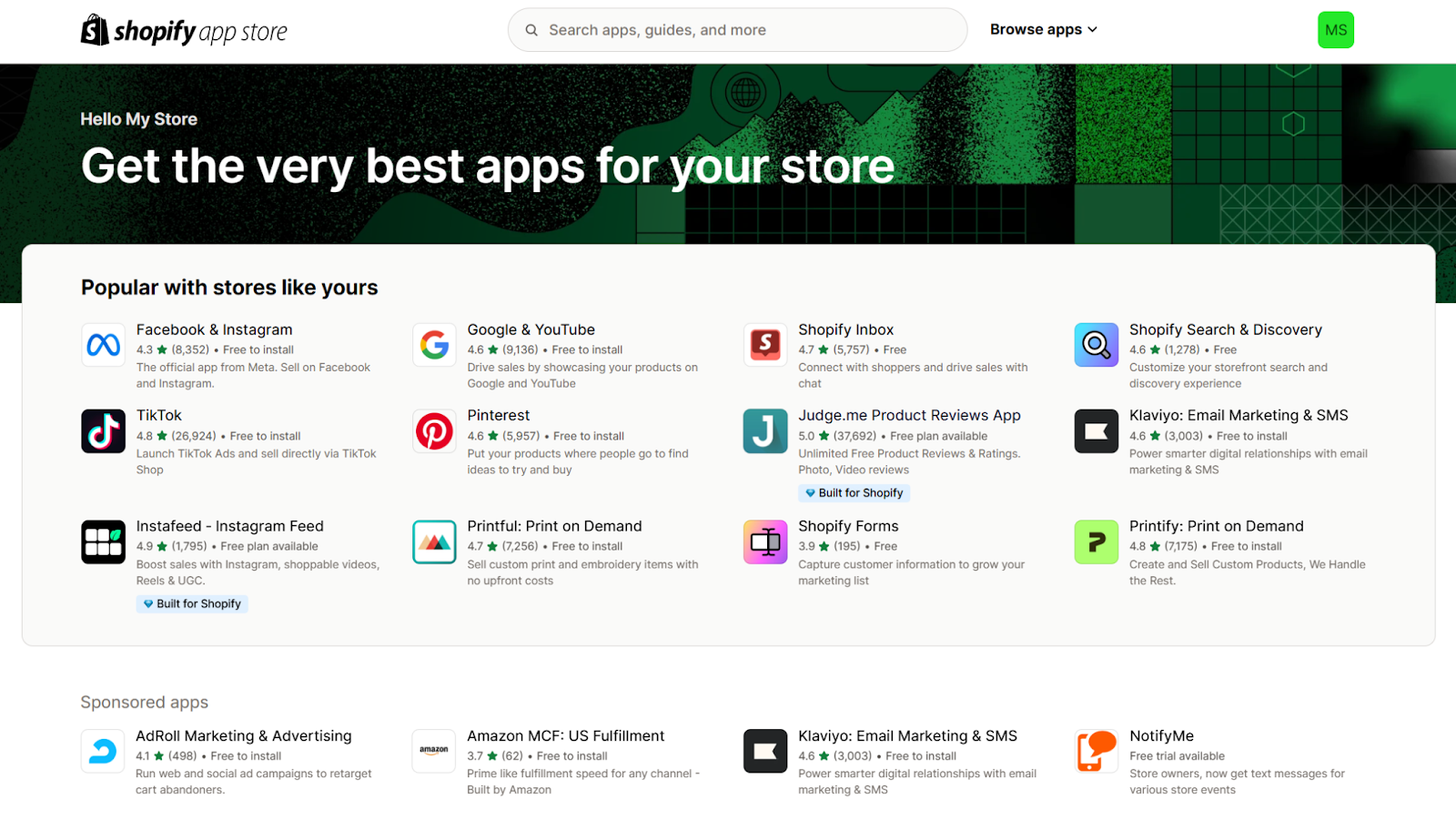
If you’d like more options or customizations than what’s built-in, you can visit the app store.
There, you’ll find more than 13,000 apps for things like marketing, design, social media, order fulfillment, product sourcing, and much more. Many of these apps are free, while others are paid or “freemium,” meaning you can access basic features for free, but need to pay to access more advanced features.
In addition to the App Store, Shopify’s robust ecosystem also includes the Shopify Partner Program. This is essentially a network of app developers, agencies, designers, and more who’ve received official approval from Shopify, and can help with virtually any aspect of your store.
It’s just another testament to the scope of just how big and impactful Shopify really is.
International, multichannel selling
Shopify isn’t just for selling through your website. You can use several different sales channels across the globe.
Shopify POS (Point of Sale), integrates in-person and online transactions seamlessly. It’s great for brick-and-mortar shops or pop-up events, letting you sell on demand while making sure inventory and sales data are synchronized across all channels.
Multiple sales channels
In addition to your store, you can embed a "Buy Button" on external sites and blogs, which takes users straight to your Shopify Checkout.
Shopify's Shop app is an online marketplace where shoppers can buy from your store. If you qualify, your store and products will be listed in Shop automatically.
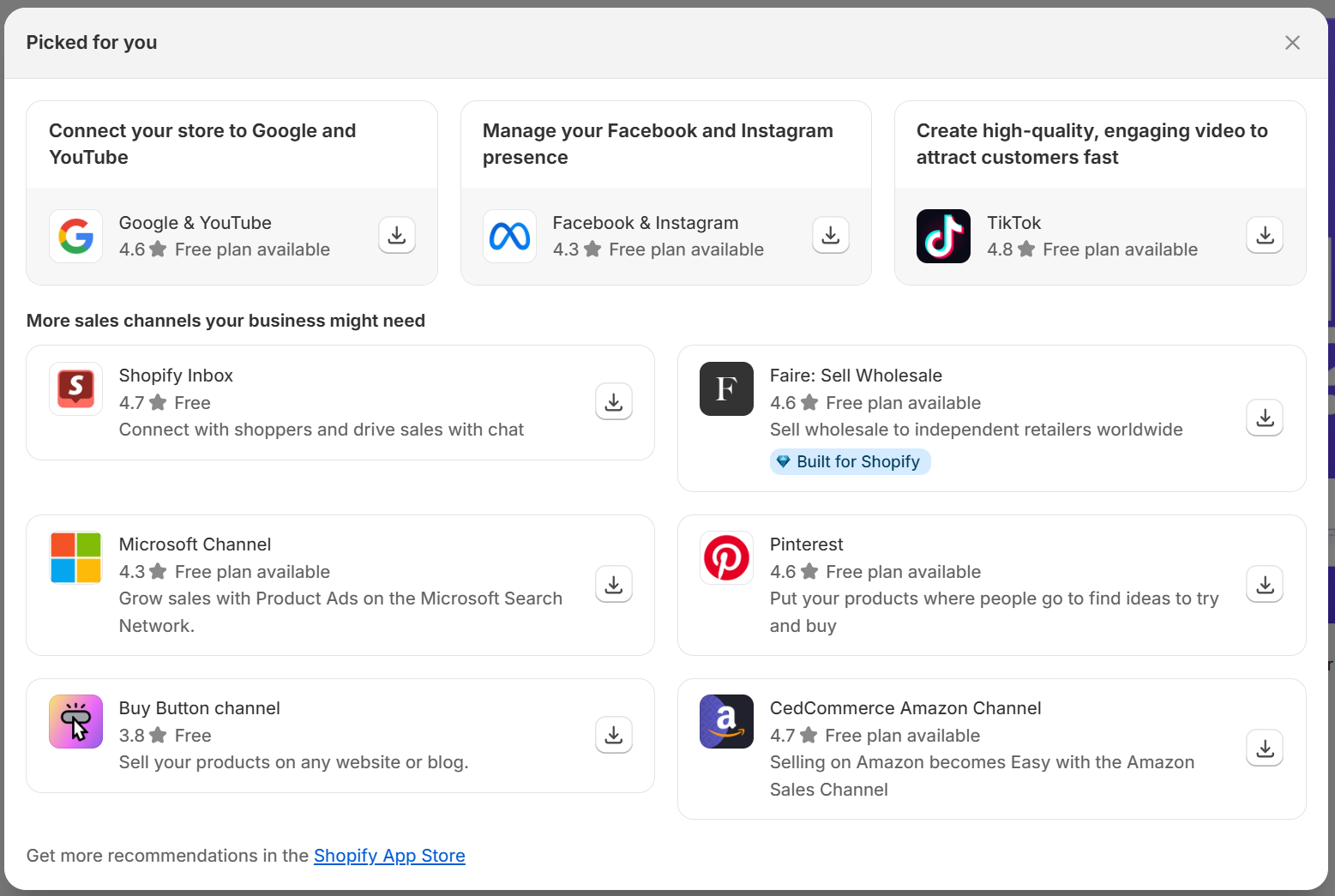
Other direct sales channels include Facebook, Instagram, and Shopify Inbox for direct chats with your customers.
You can also find dozens of third-party sales channels in the App Store. These include other social platforms like TikTok, Pinterest, Linktree, Google, and YouTube, as well as apps for things like wholesale and QR codes.
If you plan to sell or expand internationally, Shopify supports multiple currencies, languages, and international shipping options.
The Shopify Markets feature lets you localize your storefront for different regions, making it easier to connect with a worldwide audience. When you make the sale, Shopify will automatically calculate and collect taxes for different countries and regions.
Shopify Magic: The generative AI suite
Like many tools these days, Shopify integrates artificial intelligence (AI) to help stores run more smoothly and generate more sales. Shopify’s AI suite Shopify Magic lets you do things like edit product image backgrounds, write better product descriptions, answer FAQs, improve emails, and convert customers through live chat.
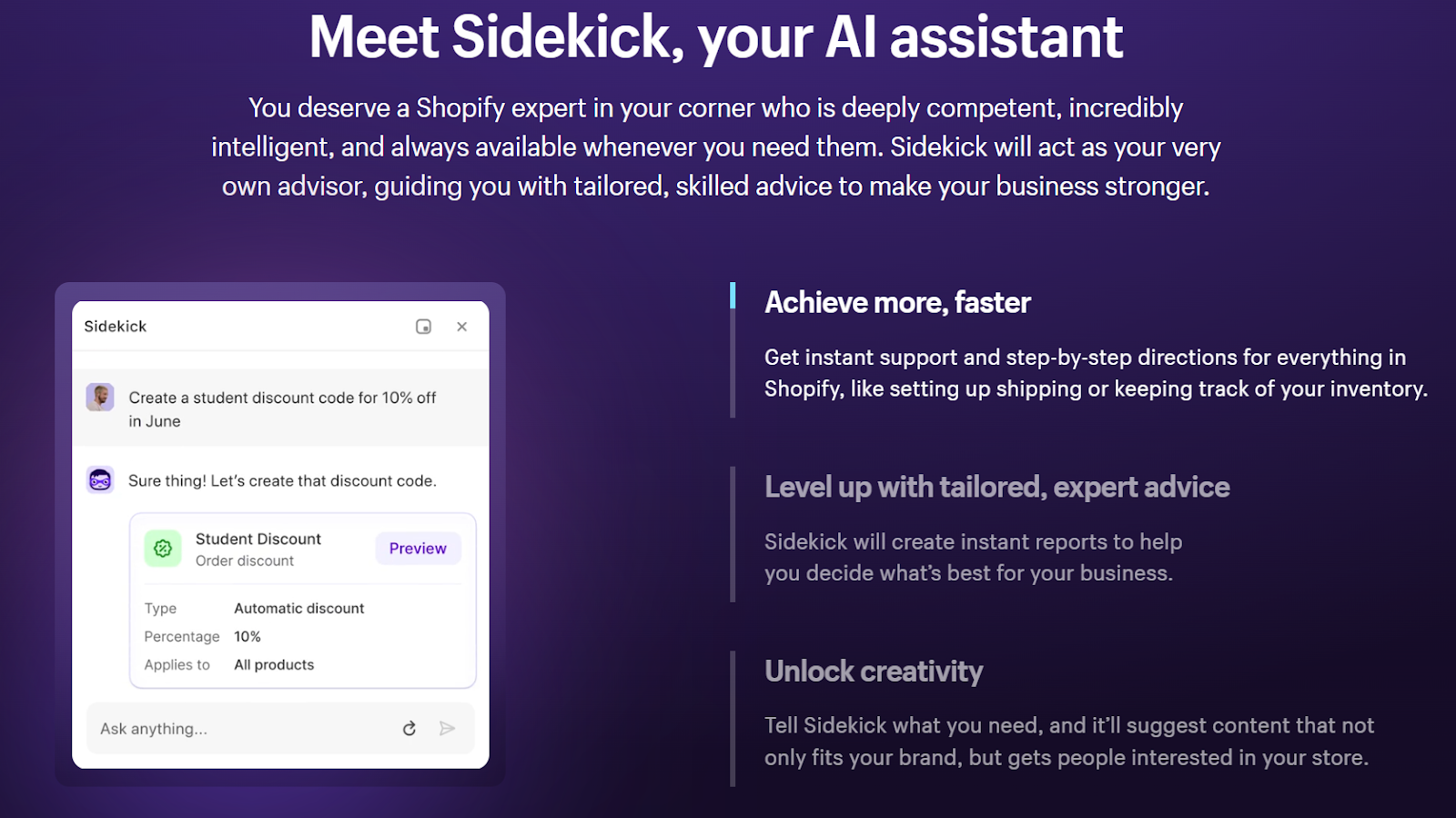
Shopify also offers Sidekick, a free AI assistant built into your admin that gives you instant support and professional-level advice tailored to your specific business.
Getting started with Shopify
Let’s take a birds-eye view of what it’s like to start using Shopify, including signing up and getting acquainted with the user interface (UI) and navigation. We’ll also take a look at basic functions like choosing a theme and adding a product.
Signing up
Signing up is a breeze. You can choose to sign up with your email, as well as your Gmail, Apple, or Facebook account.
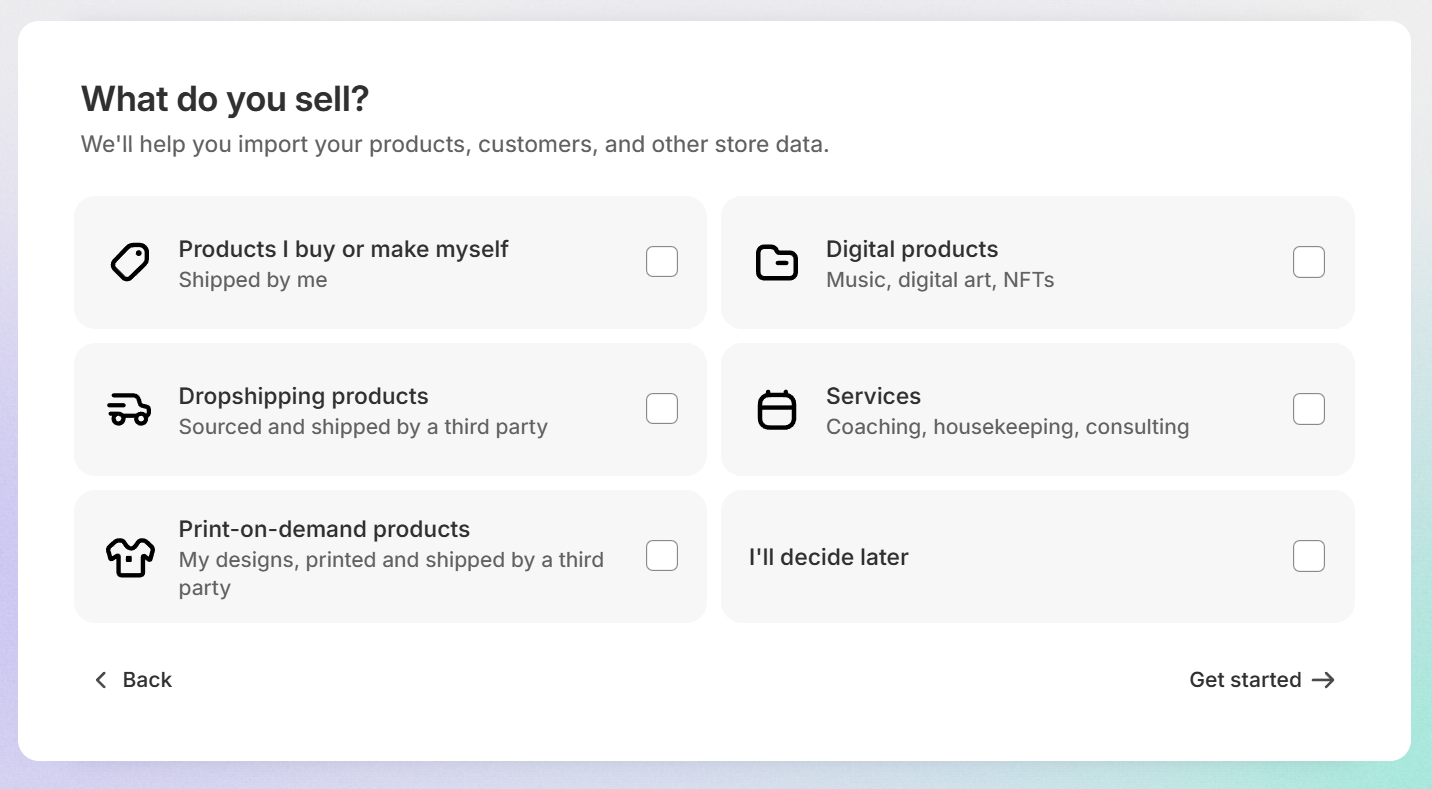
Once you enter the credentials, you’ll be asked a few optional questions that Shopify uses to help you get set up. These questions include where you’d like to sell (on your website, in person, through social media, on marketplaces, etc.), whether you have an existing business, and which types of products you sell.
Using the interface
The Shopify interface is clean, streamlined, intuitive, and easy to use. For a platform that packs in so many features and options, it’s impressive how smoothly you’re guided through.
Once you’re signed up, you’re taken to the dashboard. There’s a handy setup guide on the main screen, offering you a checklist for 4 key categories in your journey: adding products, selling online, store settings, and launching your store. Use this checklist as a guide to build and launch.
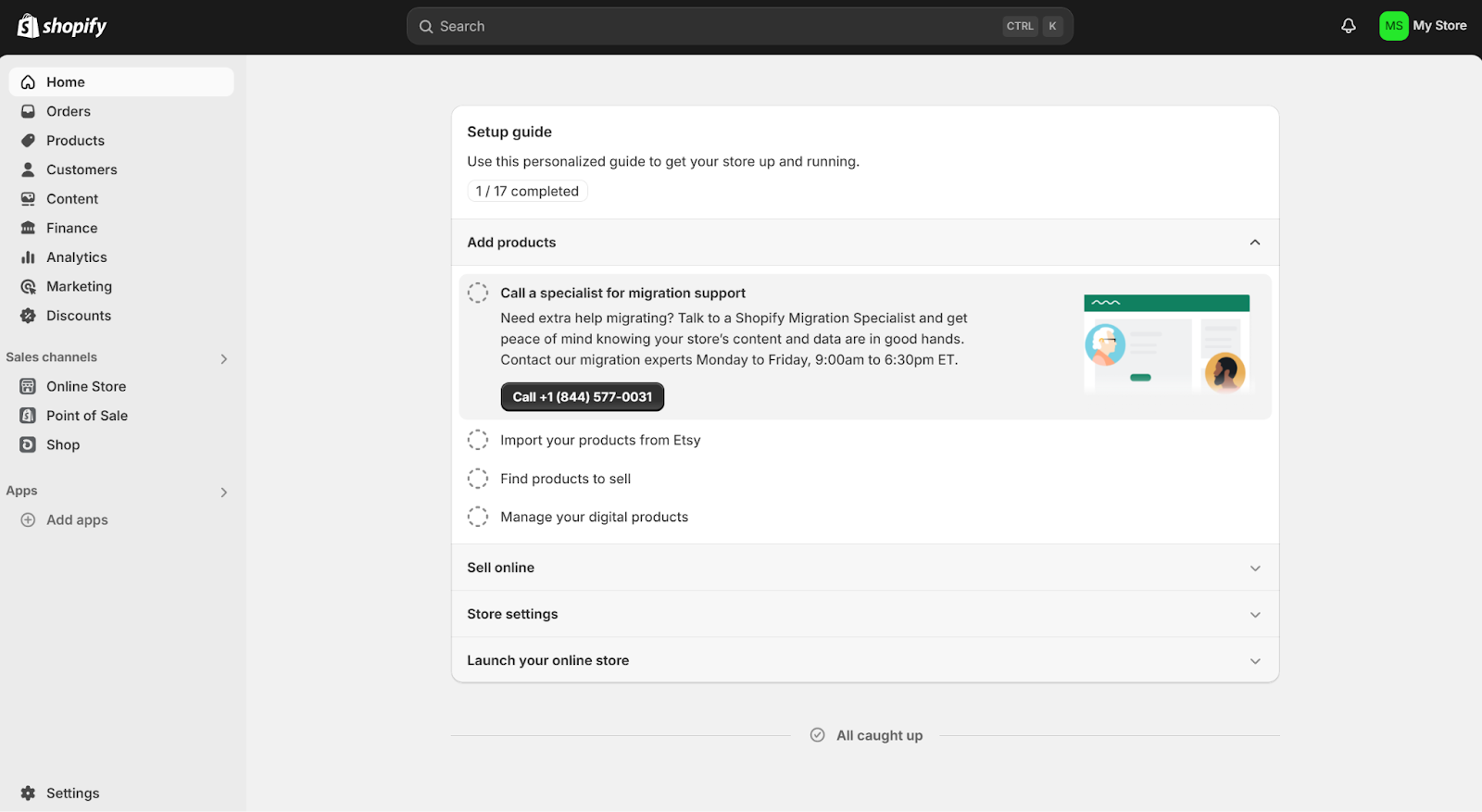
The left navigation menu is where all the action is. You’ll use this to navigate to your orders, products, customers, finances, analytics, marketing, and discounts. You’ll also be able to manage your sales channels and apps.
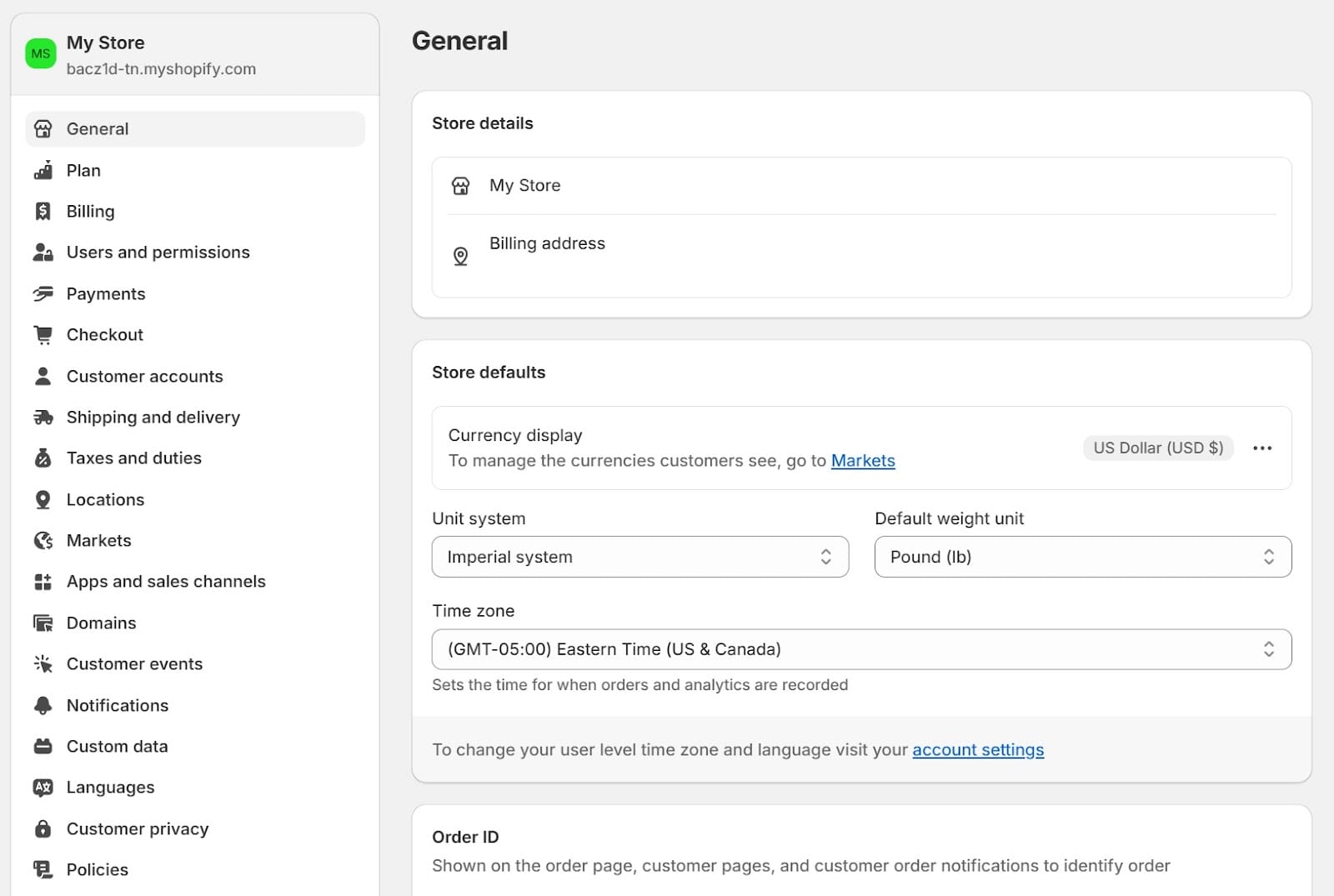
At the bottom left, you’ll find your store settings. Here’s where you can edit things like billing, payments, shipping, taxes, apps, policies, and more.
Choosing a theme
Before you can get your store up and running, you’ll need to choose the right theme (also called a template). To do this, go to the Sales channels section and click Online Store, then Themes. Here, you’ll be able to choose from Shopify’s 13 free themes, or head to the Theme Store to purchase one of the 215 paid themes.
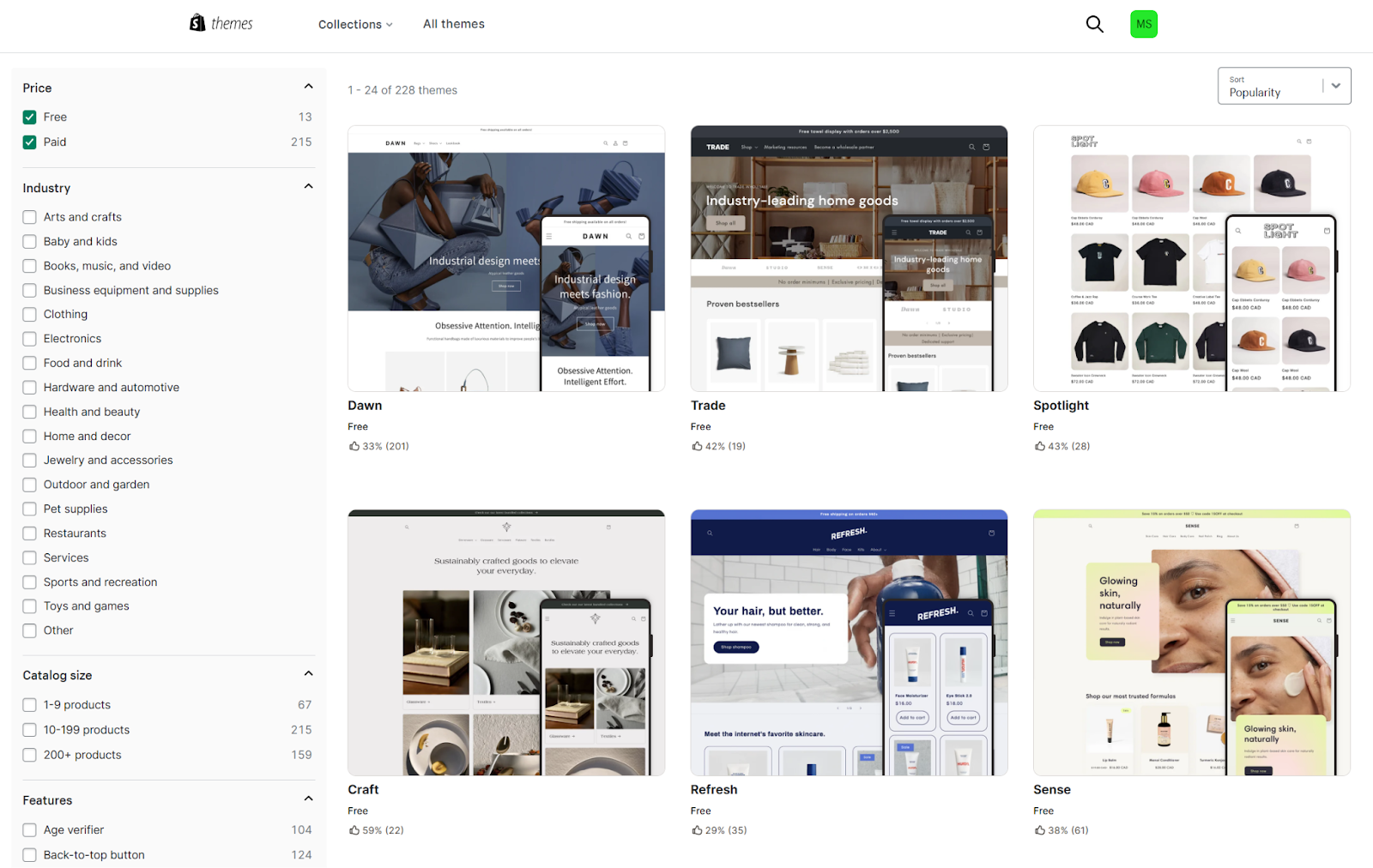
These range from $100 to $500 USD, and you can sort based on criteria like industry, catalog size, and features. Some themes were developed with specific industries in mind. Shopify’s themes are high-quality and fully responsive, meaning they’ll automatically adapt to your visitors’ screen size on desktop, mobile, or tablet.
Shopify’s free theme selection is smaller than general website builders like Squarespace and Wix, which offer a much larger library of templates. But it’s in line with ecommerce-focused competitors like BigCommerce and WooCommerce, and every theme is built specifically for selling online.
Customizing your Shopify theme
Once you’ve chosen a theme, click Customize. Here, you can transform the theme into your brand vision.
Shopify uses drag-and-drop WYSIWYG ("what you see is what you get") functionality to let you click your way to a beautiful store, no coding required. If you do have development skills, you can add your own files too, like HTML and CSS.
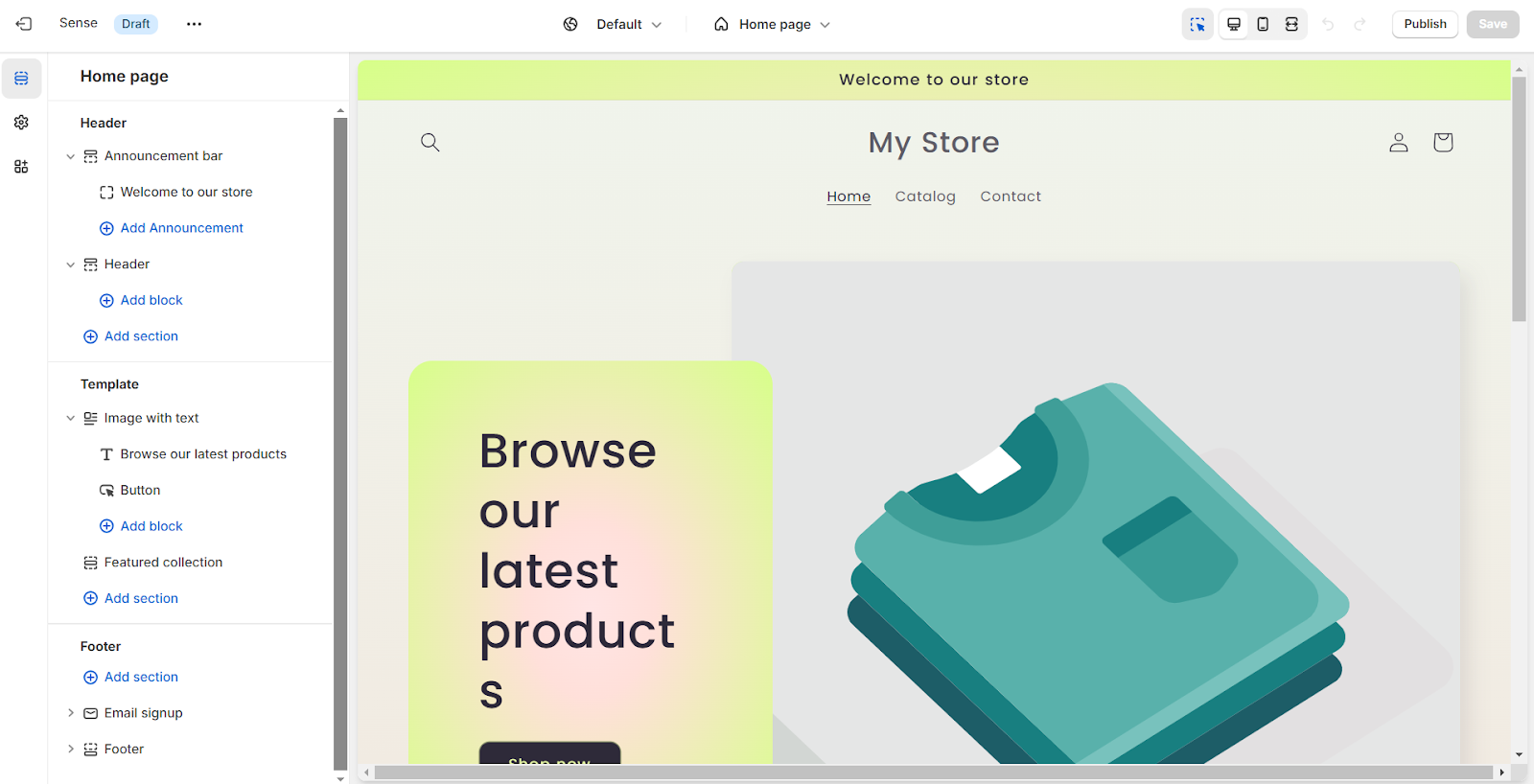
When you click any section on the template, the left sidebar will open your customization options. Upload your logo and images, change brand colors, type in headlines and descriptions, add or delete sections, create CTA (call to action) buttons, and more.
You’ll find plenty of pre-set section formats, like:
- Featured collections and products
- Collection lists
- Image with text
- Slideshow or collage
- Multicolumn or multirow
- Email signup
- Contact form

When you add products, they'll automatically populate into the theme's design. Which brings us to our next topic.
Adding a product
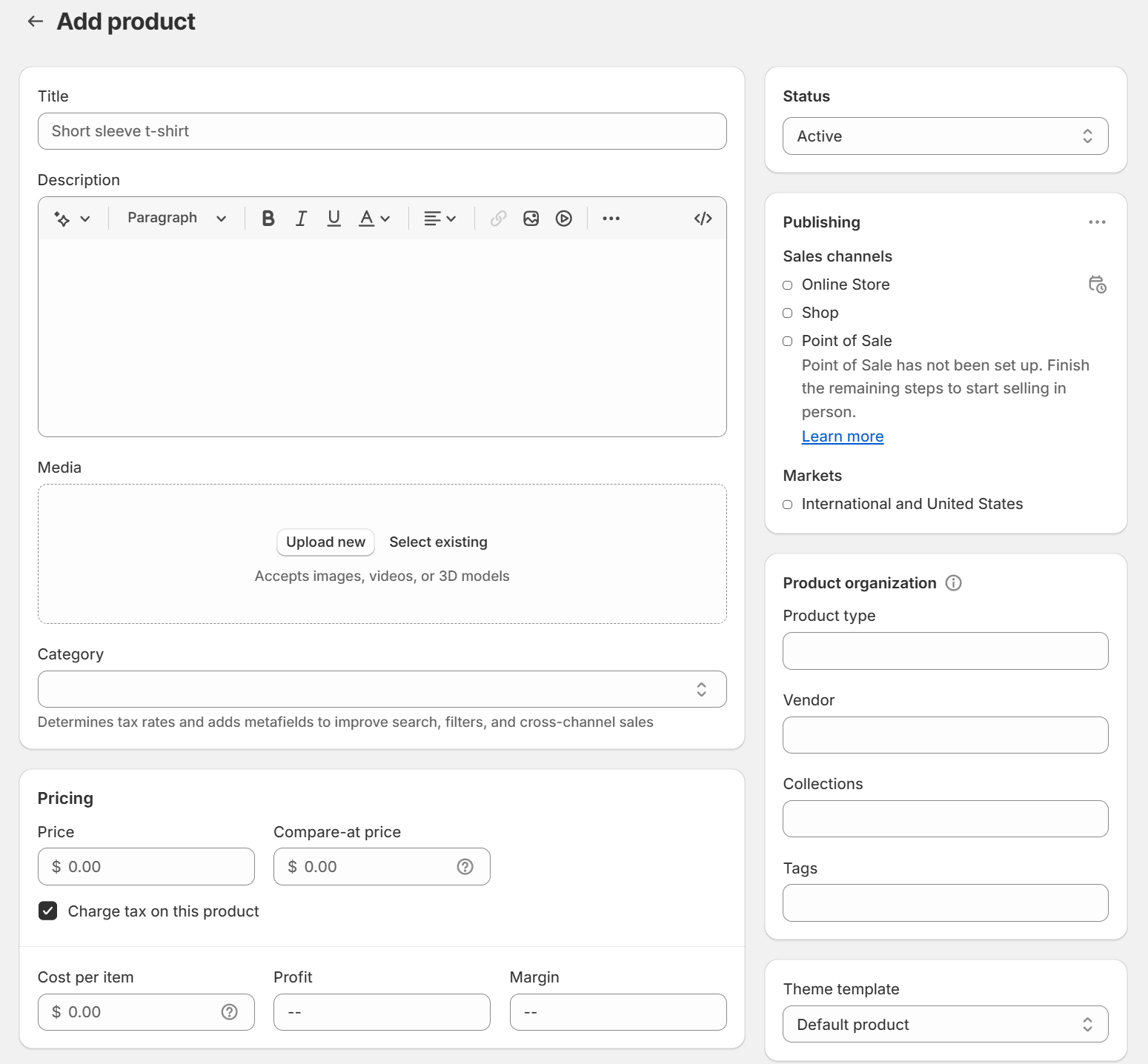
Go to the Products tab and click Add Product. If you’re importing existing product data, click Import and upload a CSV file. If you have an Etsy store, you can download the “Store Migration” app to directly import your Etsy product data.
On this page, you’ll be able to edit things like:
- Title: The product name as seen on your website.
- Description: Be as descriptive and helpful as possible. Use the Shopify Magic button at the top left to help generate a description based on key features, keywords, and desired tone.
- Media: Your product photos. Use Shopify Magic to remove the background or generate your own for a more professional or branded touch.
- Category: Choose the category type and Shopify will suggest some helpful metafields, or additional data, that can calculate tax rates and improve your filters, search, and cross-channel sales.
- Pricing: You can also add a “compare at” price and internal notes for your own reference, like cost per item and profit.
- Variants: Specify how many options the product comes in, like color, size, weight, finish, material, and more. You can choose 3 categories and create up to 100 unique variants for each product.
Shopify’s best features and tools
Shopify boasts a wide range of built-in features to help you hit the ground running. Let’s take a closer look at a few.
Order management and delivery
Shopify aims to streamline the way you manage orders, fulfillment, and delivery. Instead of juggling manual spreadsheets and systems, these features are all built in.
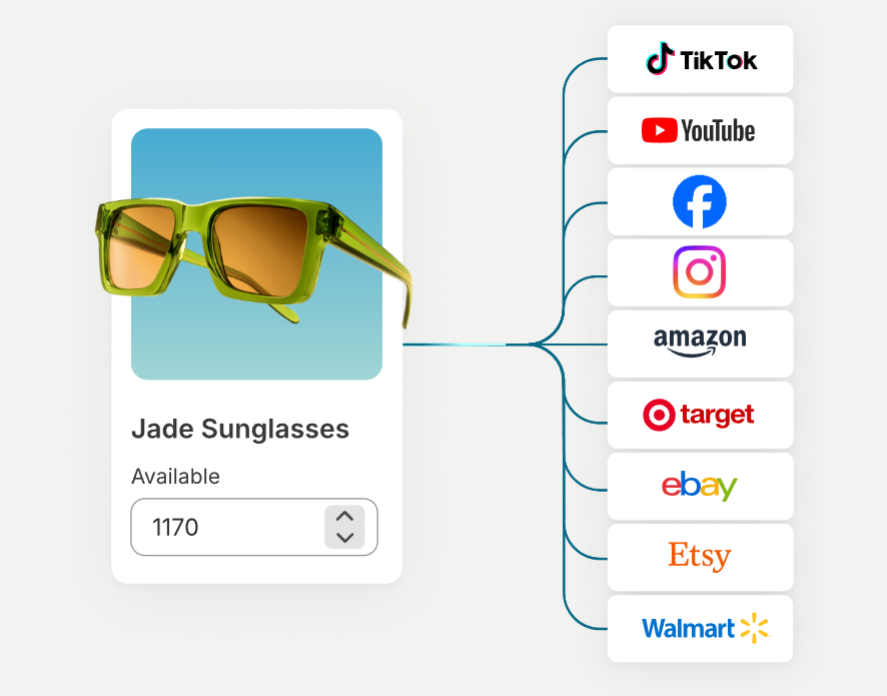
You can manage inventory across all your sales channels, both online and offline. For example, if you sell on your website, Instagram, Amazon, Google, and a brick-and-mortar store, Shopify automatically syncs and updates inventory so you know what’s where.
When it's time to get orders out to your customers, you can buy and print up to 100 shipping labels in bulk. Shopify Shipping partners with global carriers like USPS, DHL, and UPS to simplify your shipping. The feature also offers discounts of up to 88%.
Workflow automations
With Shopify Flow, you can set up end-to-end automation to save time for what matters most. These automations can include anything from flagging high-risk orders to creating shipping labels to notifying customers when a delivery is late.
You can set your automation workflows to take action based on certain conditions. When those conditions are met, your desired actions are triggered.
Flow has hundreds of pre-built templates that you can customize, or you can create your own. It works with several tools like Slack, email, Trello, Google Sheets, Asana, and Klaviyo.
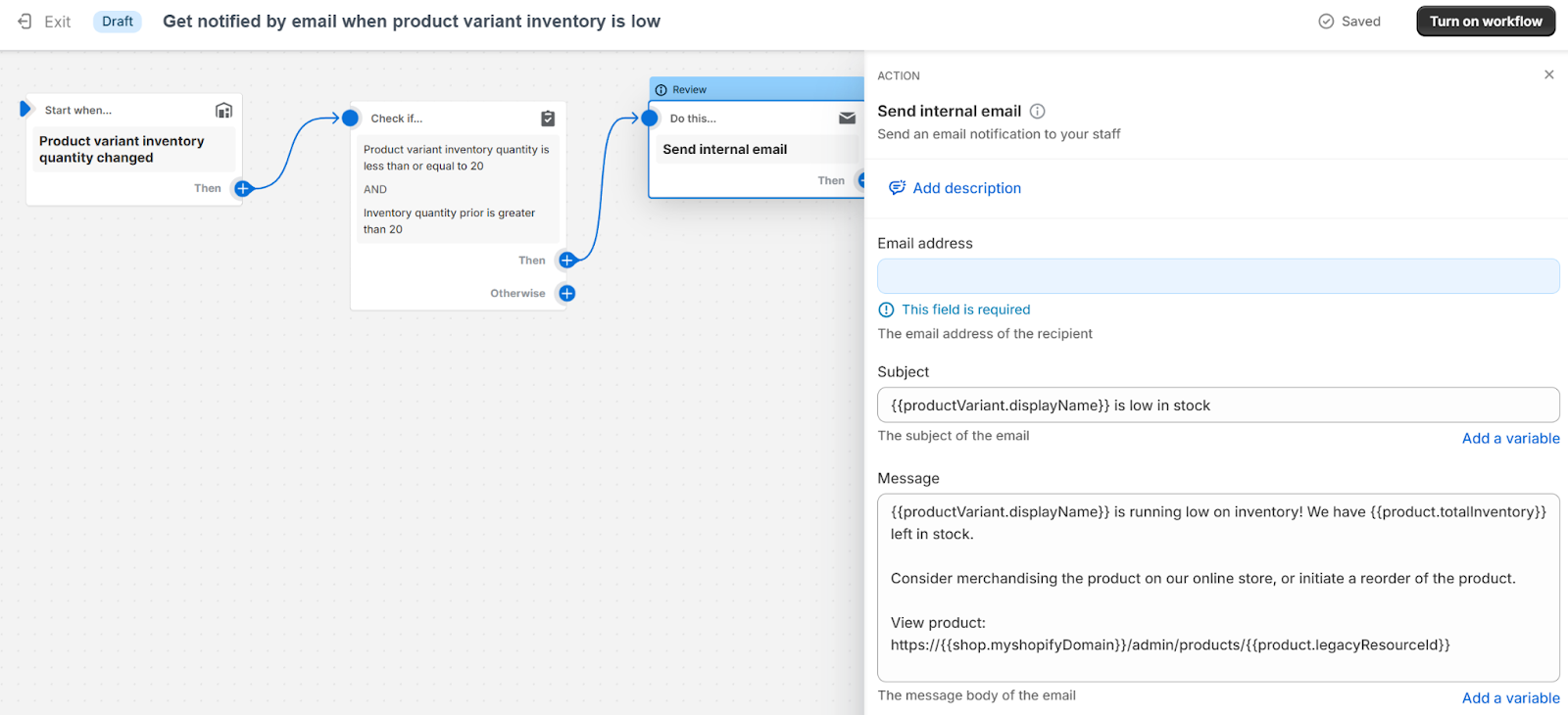
For example, here’s the automation template titled “Get notified by email when product variant inventory is low.” Whenever an item is sold, it will check if the inventory just dipped below 20 items. If it did, the workflow will trigger an internal email to let your team know. You can edit the email right inside the workflow.
Here are a few other examples of these powerful and impressive templates:
- Organize customers by lifetime spend tiers
- Tag orders by sales channel
- Segment customers by purchase behavior
- Create redirect URL when a product's status changes
- Email a customer when a wishlist item is on sale
- Create support ticket when a product question is asked
- Tag unfulfilled orders older than 2 days
Automation can have a huge impact on your daily operations and overall business productivity. Take a look at what ecommerce automation is and how it can help your business.
Marketing
Marketing is perhaps one of the most underestimated aspects of growing a business. You’ll never make any sales if you never get any website visitors. And you’ll never get any website visitors unless you work hard to earn them.
Shopify has a suite of built-in features, apps, and integrations to help you along the way.
Shopify’s marketing activities fall under 4 categories: ads, email, social posts, and SMS. You can set your marketing campaigns up directly through your Shopify dashboard, then track and tweak them from there.
Some of these campaigns can be set up using extensions offered in the dashboard (like the ones below), or you can head over to the app store and choose from over a dozen other apps that integrate with Shopify Marketing.

For example, Shopify Email has dozens of pre-built email marketing templates that you can edit in a similar way you edit your website’s theme. Just choose your template, plug in your custom text and images, and add special sections and offers as you see fit.
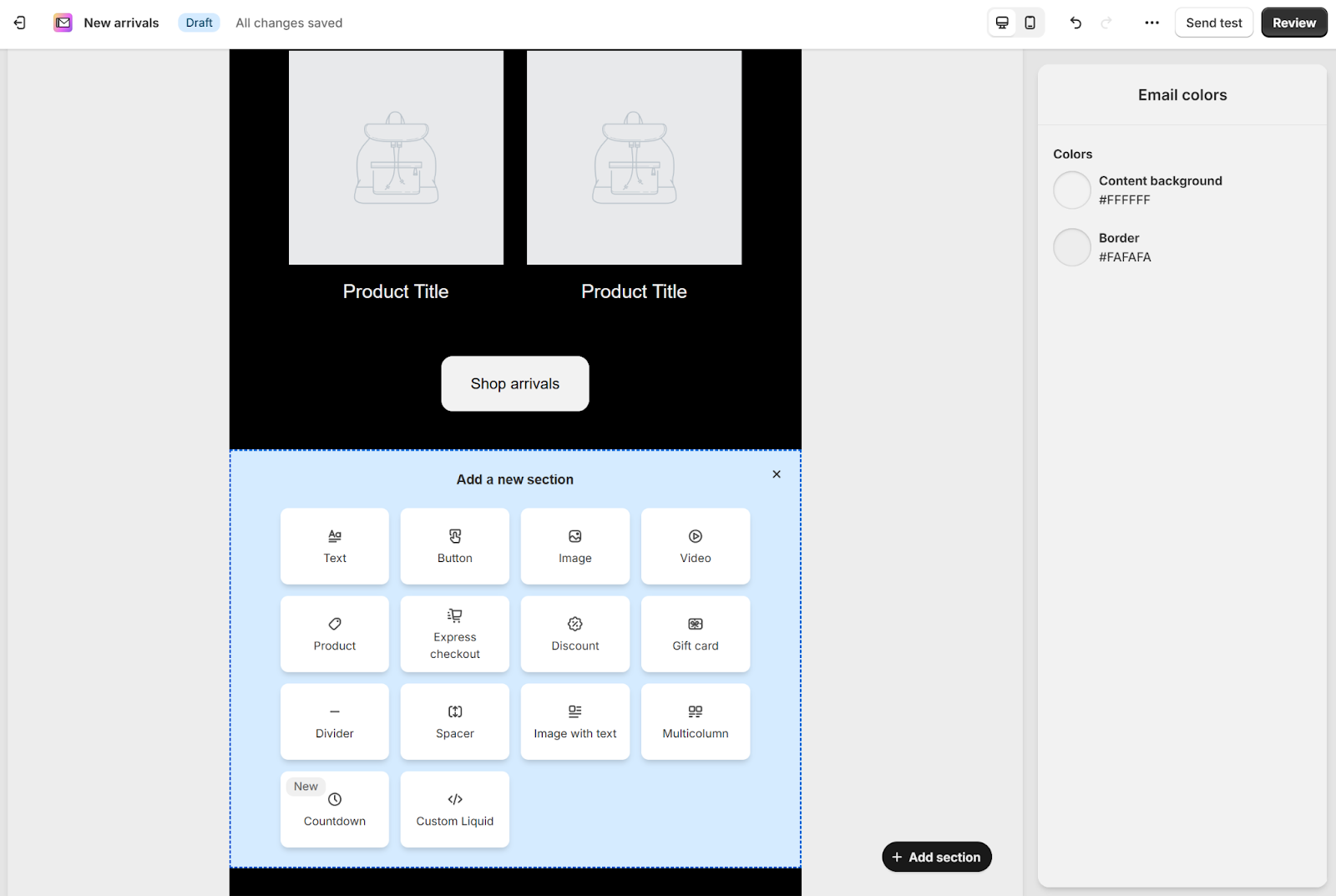
Marketing is a huge umbrella term that covers a ton of different strategies and tasks. Check out these helpful ecommerce marketing strategies to increase your sales.
Marketing automations
In addition to store management automations, Shopify’s Flow app also offers convenient marketing automations.
Take for example the “Recover abandoned checkout” automation. If a customer begins the checkout process but doesn’t finish their purchase, the default workflow will:
- Wait 10 hours and check if the customer has come back to place an order yet
- Check if you still have the product(s) in stock
- Send a marketing email to recover the checkout and convert the customer
Like other workflow automations, you can customize and set whatever conditions you want.
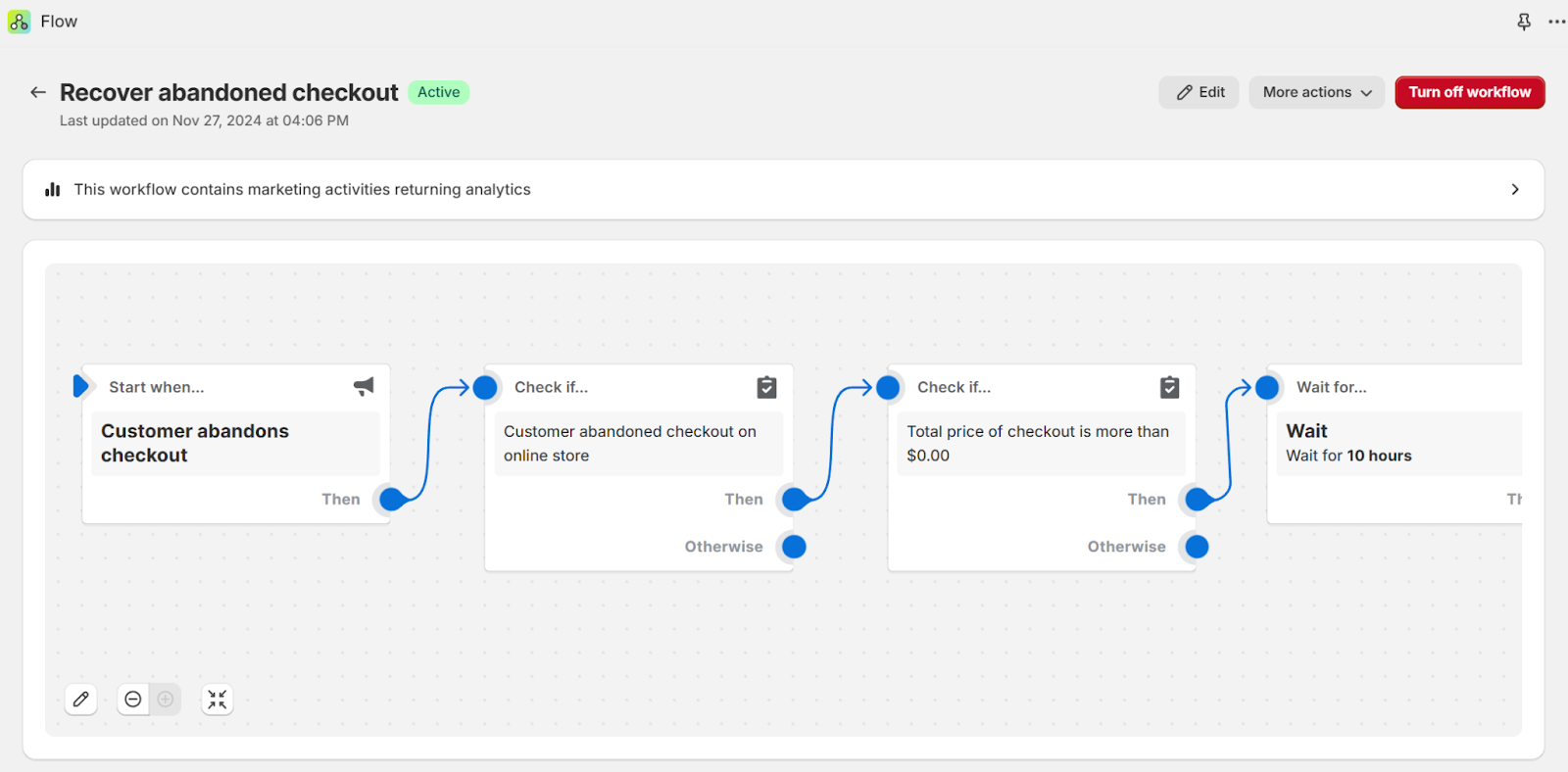
Shopify offers more than a dozen automation templates, or you can make your own from scratch.
Here are some other template examples:
- Welcome new subscribers with a discount email
- Celebrate customer birthday
- Upsell customers after their first purchase
- Welcome VIP customers
- Send a back in stock notification
Blog
Blogging can be a great marketing tool for spreading the word about your store, making announcements, educating your visitors, and drawing in more traffic. Shopify offers basic blog functionality to help.
Shopify’s blog editor focuses on the essentials. You can add a title, body content, and an excerpt, and edit the SEO by optimizing the title, description, and URL. You can also add a featured image and tags for organization.
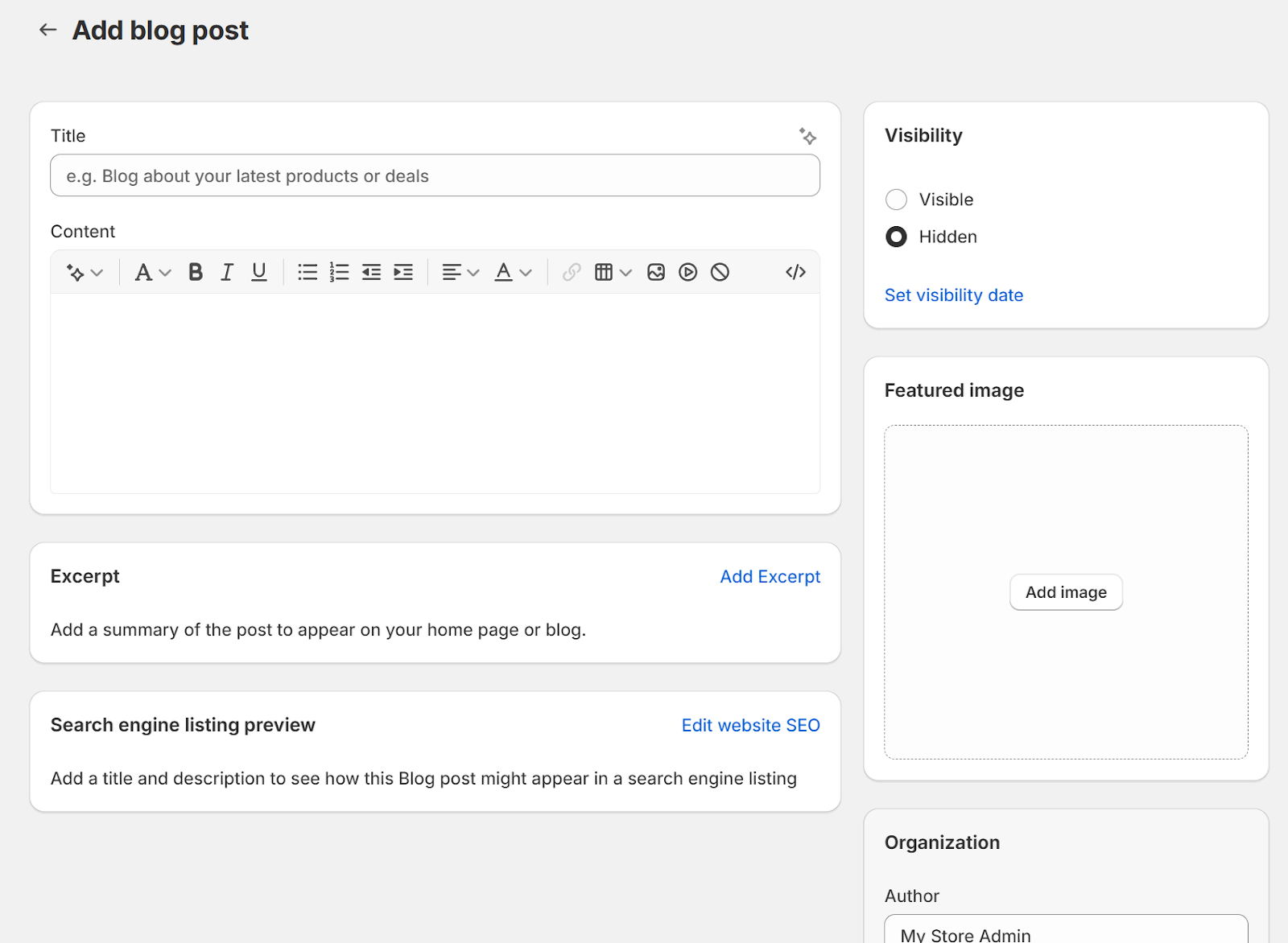
It’s simpler than dedicated blogging platforms like WordPress, so if content marketing is central to your strategy, you can extend it with custom HTML or a blogging app from the App Store.
Read this guide to understand how to do SEO for Shopify.
Analytics and reporting
Shopify offers 93 built-in reports that measure your performance based on 11 categories. To give you an idea of what these reports cover, here’s one from each category:
- Acquisition: Sessions by location
- Behavior: Top online store searches
- Customers: First-time vs returning customer sales
- Finances: Net sales with cost
- Fraud: Fraudulent chargeback rate
- Inventory: Average inventory sold per day
- Marketing: Sales attributed to marketing
- Orders: Fulfillment, shipping, and delivery times
- Profit margin: Profit by product
- Retail sales: Retail sales by product vendor
- Sales: Sales by checkout currency
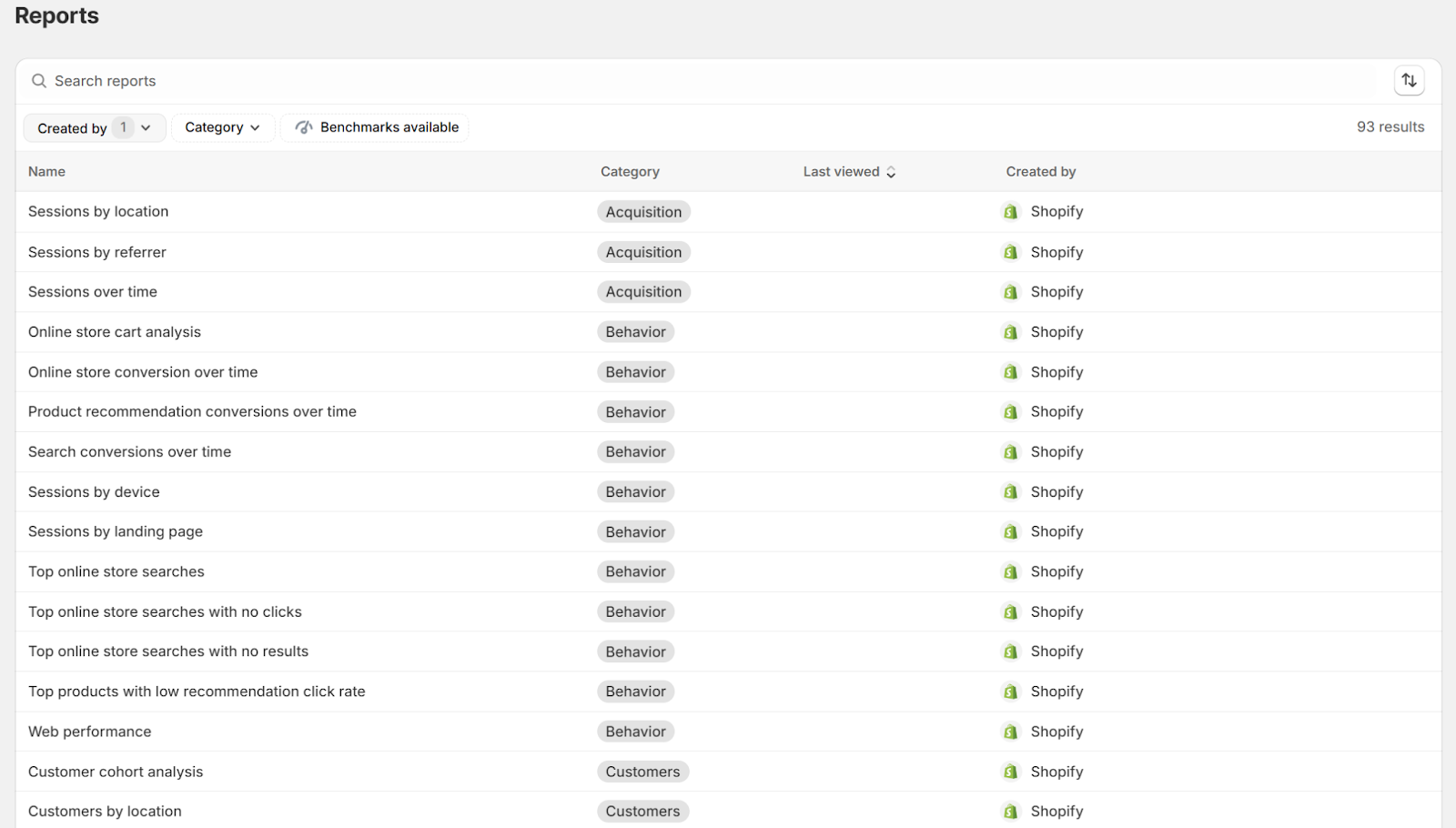
These reports can help you make impactful decisions in your store. For example, say you’re looking at the “Top online store searches with no results” report. This can tell you what shoppers are looking for that you don’t have yet, which can be a great place to start if you’re looking to build out your offerings.
If you’re on the Basic or Grow plan, you can adjust your reports by filtering data, editing columns, and choosing different time ranges. For custom reports, you’ll need the Advanced or Plus plan.
Tax calculation
For users in the US, EU, and UK, Shopify Tax simplifies the headache of calculating and collecting taxes.
When your customer makes a purchase, the Shopify Tax tool automatically collects the right sales tax amount based on your product pricing and your customer's address.
The tool will also:
- Track where you might be legally required to collect sales tax
- Suggest product categories to ensure your orders get accurate rates and exemptions
- Scan for and apply tax rate changes, tax holidays, and new regulations
Keep in mind that Shopify Tax is free up to $100,000 in sales. After that, you’ll have to pay a transaction fee of 0.35% (0.25% for Plus users).
Customer support
Shopify’s support options scale with your plan.
Users on the Basic and Grow plans have access to 24/7 live chat and email support. Users on the Advanced plan get what Shopify calls 'enhanced live chat' support, and Plus users get priority support via phone and live chat.
If you’d like to learn and solve problems on your own, Shopify provides a comprehensive Help Center, which includes detailed guides, tutorials, community events, and troubleshooting articles on a wide range of topics.
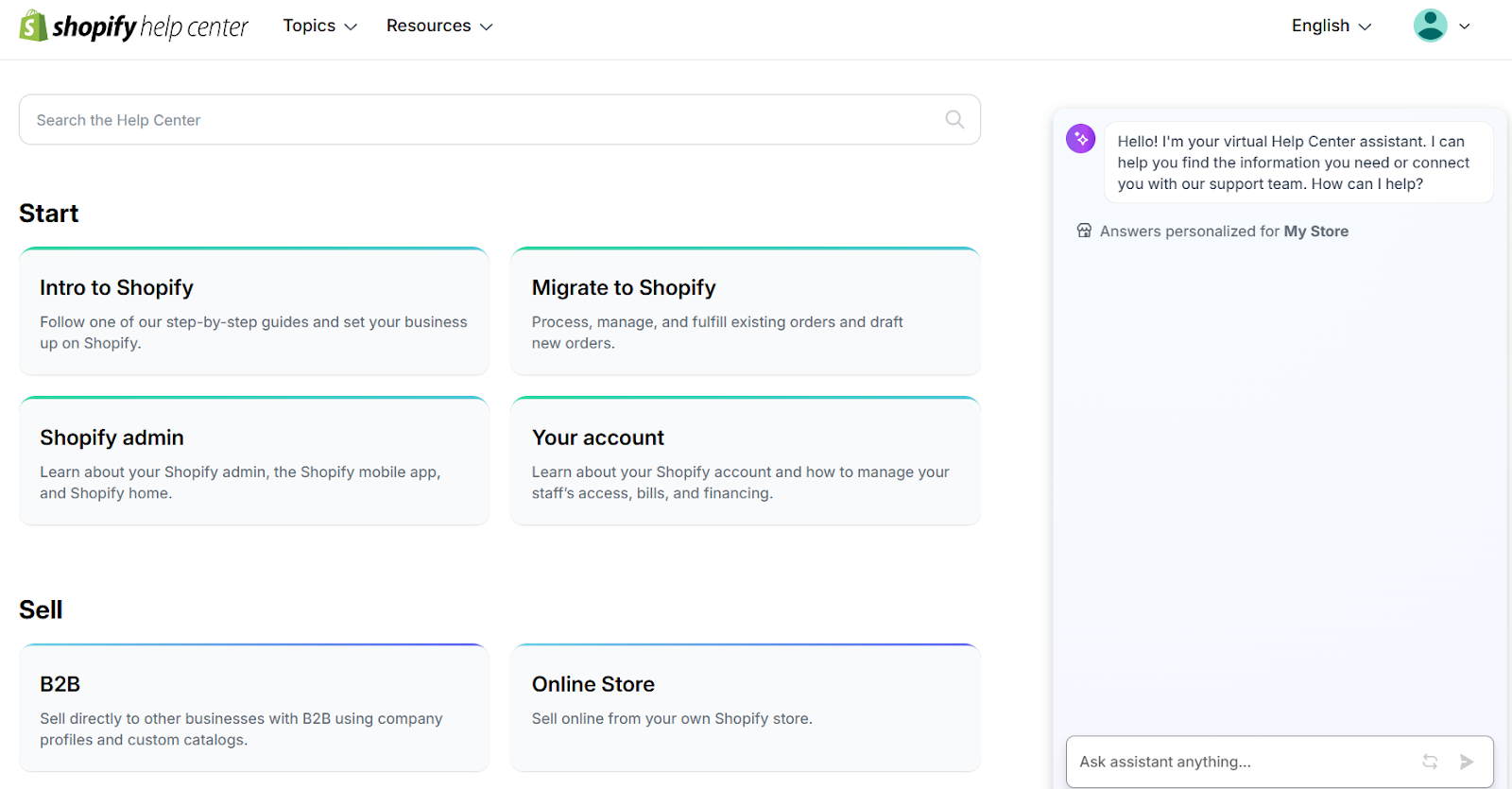
Other support resources include:
- Shopify Community Forums, which allow merchants to connect, share insights, and get advice from others who may have had similar experiences
- Shopify Academy, which offers free courses and webinars
- Shopify Blog, which is packed with ecommerce tips and industry trends
These tools make it easy to find answers and learn best practices to grow your store.
Safety and security
Shopify takes security and safety seriously. It offers comprehensive features to ensure a secure shopping experience for both merchants and customers. Here are a few of the key security features.
PCI compliance
Shopify is Level 1 PCI DSS compliant, which means it adheres to the highest standards of payment security set by the global PCI Security Standards Council. Merchants don’t need to worry about meeting PCI compliance themselves since Shopify handles it for all its stores.
SSL certificates
All Shopify stores include a free SSL (Secure Sockets Layer) certificate, which encrypts, or “locks,” data transferred between the store and its visitors. SSL certificates boost customer trust and deter hackers by showing a padlock icon and “https://” in the browser.
Secure payments
Shopify integrates with major secure payment gateways like PayPal and Stripe. Shopify Payments also includes advanced fraud detection to minimize the risks that are often associated with online transactions.
Data protection and backups
Shopify takes care of automatic backups for all store data, making sure your critical information is never lost. They also use top-tier data encryption for sensitive data like customer payment information.
Fraud prevention tools
Shopify offers built-in fraud analysis tools to detect suspicious orders. These tools flag potentially fraudulent transactions based on things like mismatched billing addresses or unusual purchasing patterns.
GDPR and privacy compliance
Shopify complies with international privacy laws, including the General Data Protection Regulation (GDPR) and the California Consumer Privacy Act (CCPA). You can be sure that your customers’ data is handled safely and responsibly.
How much does Shopify cost?
When you’re weighing out whether a new tool is worth it, cost is one of the most important questions.
Let’s look at what it might realistically cost you to run a business long-term on Shopify.
Shopify monthly fees
Like many of its direct competitors, Shopify offers a tiered pricing model with 4 main options: Basic, Grow, Advanced, and Plus. It’s worth noting that there’s a 25% discount on the first 3 options if you choose to pay once yearly instead of every month.
Here’s a breakdown:
| Plan | Cost if paid monthly | Cost if paid yearly | Savings |
|---|---|---|---|
| Basic | $39/month | $29/month | $10/month, or $120 per year |
| Grow | $105/month | $79/month | $26/month, or $312 per year |
| Advanced | $399/month | $299/month | $100/month, or $1,200 per year |
There’s also the Plus plan, which starts at $2,300/month on a three-year term.
Here’s an overview of what you get with each tier. Keep in mind that this is a short summary—visit Shopify’s pricing page for a complete breakdown and comparison of features.
Basic
- Full store-building features
- Unlimited products and services
- Templates and themes
- Sales channels
- Standard analytics
- Unlimited hosting and custom domain
- All marketing features
- Language translation and currency conversion
- 3 custom localized selling markets
- All tax features
- Customer support via live chat only
- No additional staff accounts
Shopify
- Everything in the Basic plan
- 5 additional staff accounts
- USPS discounts on small packages
- Shipping insurance up to $200
Advanced
- Everything in the Shopify plan
- Custom reports and analytics
- 15 additional staff accounts
- Enhanced live chat support
- 3rd party calculated shipping rates
- Estimated duties and import taxes
Plus
- Everything in the Advanced plan
- Unlimited staff accounts
- 50 custom localized selling markets
- Business-to-business (B2B) selling
- Advanced checkout customizations
- Custom app
- Priority support via phone or live chat
- Shopify Plus Academy
Extra Shopify costs
Once you have an idea of what you’ll pay to get started, you’ll need to factor in the cost of running your store on a day-to-day basis.
The core considerations are credit card rates and transaction fees.
On the Basic plan, Shopify Payments rates are 2.9% plus 30 cents per online sale. If you use a third-party payment provider instead, Shopify adds a 2% transaction fee on top of that provider’s own rates.
On each plan tier, the fees decrease slightly:
- Shopify plan: 2.7% plus 30 cents, plus an additional 1% if you’re using a third-party payment provider
- Advanced plan: 2.5% plus 30 cents, plus an additional 0.6% with a third-party payment provider
- Plus plan: what Shopify lists as "the most competitive rates," or an additional 0.2% with a third-party payment provider
Another consideration is store design costs, like paying for a premium theme or hiring a developer, designer, or marketer to help bring your ideas to life. These costs depend on what you need, from under $100 for quick design work to several thousand dollars for full-scale services.
You may also want to add apps from the App Store, such as a more robust email marketing app, a page speed optimizer, or an automation tool. Many apps offer free plans, while paid apps range from a few dollars to hundreds of dollars per month, depending on the features you need.
Here’s an idea of what those extras might be:
- Marketing apps
- SEO tools
- Platform or service integrations
- Customer service apps
- Dropshipping or print-on-demand apps
- Wholesale features
- International selling tools
- Advanced analytics
Is Shopify worth it for physical products?
Selling physical products comes with its own set of challenges, and Shopify aims to solve many of them with its robust tools.
Let’s explore what Shopify offers and how it fits different types of businesses.
How does Shopify support online sellers?
Shopify’s online store features are built with sellers in mind.
You can choose from a range of modern, responsive themes that make your products look professional. It also offers tools for product organization, detailed descriptions, and high-quality images. Features like SEO optimization and customizable checkout pages help create a smooth shopping experience for your customers.
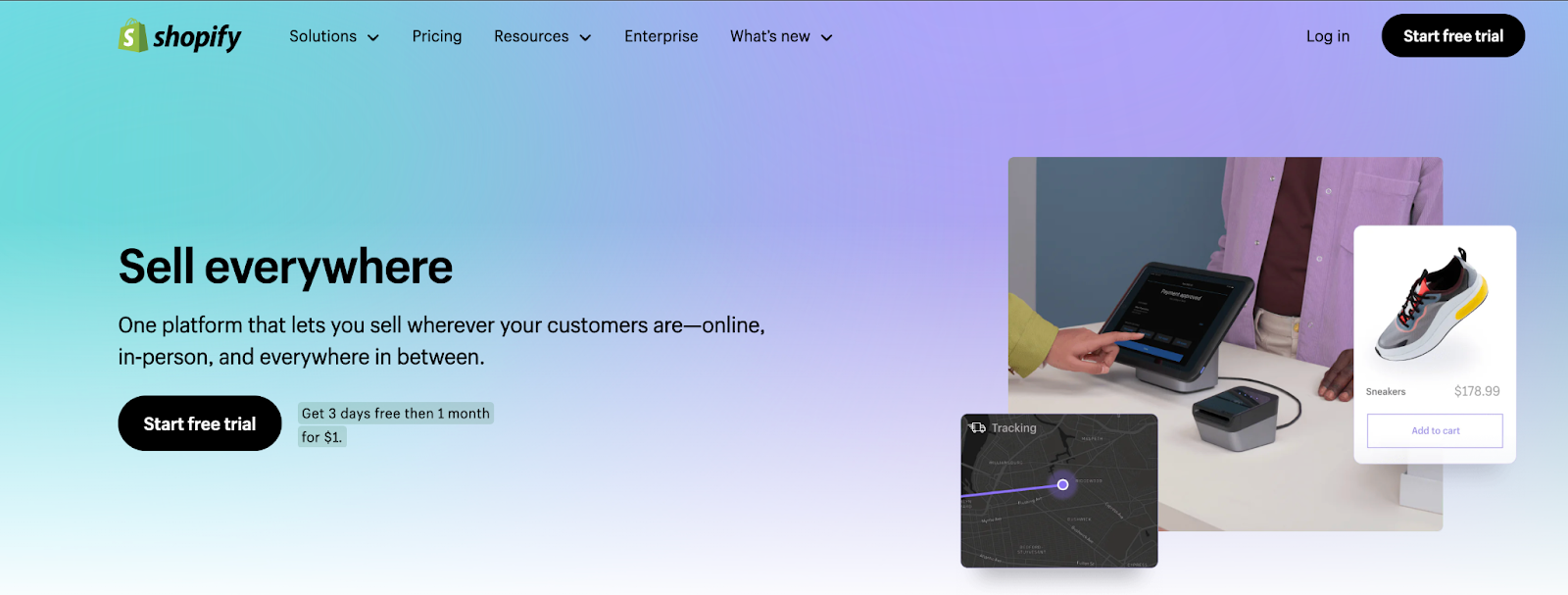
For more advanced needs, Shopify’s App Store gives you access to tools like upselling, customer reviews, and email marketing, so you can add features as your store grows.
How does Shopify handle inventory?
Shopify streamlines inventory management for physical product sellers.
You can manage stock levels, track variations (like size or color), and even organize products into categories for better browsing. If you’re running a multi-location business, Shopify lets you sync inventory across warehouses and storefronts in real-time.
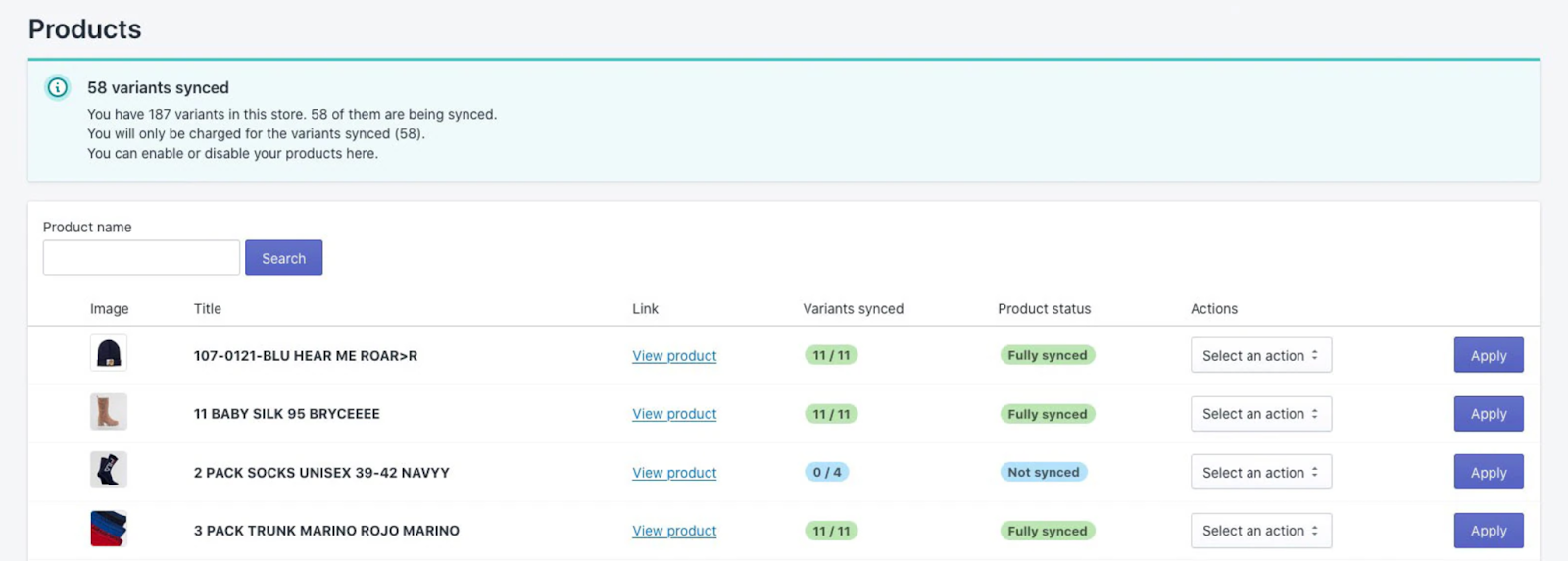
For more specialized setups, like subscription boxes, you can add third-party apps from the App Store.
How does Shopify handle shipping?
Shipping can be a headache, but Shopify takes a lot of the pain out of it.
You can print labels, offer different shipping rates (flat, free, or based on location), and even give your customers real-time tracking updates. They also partner with carriers like USPS, UPS, and DHL, so you can get discounted rates.
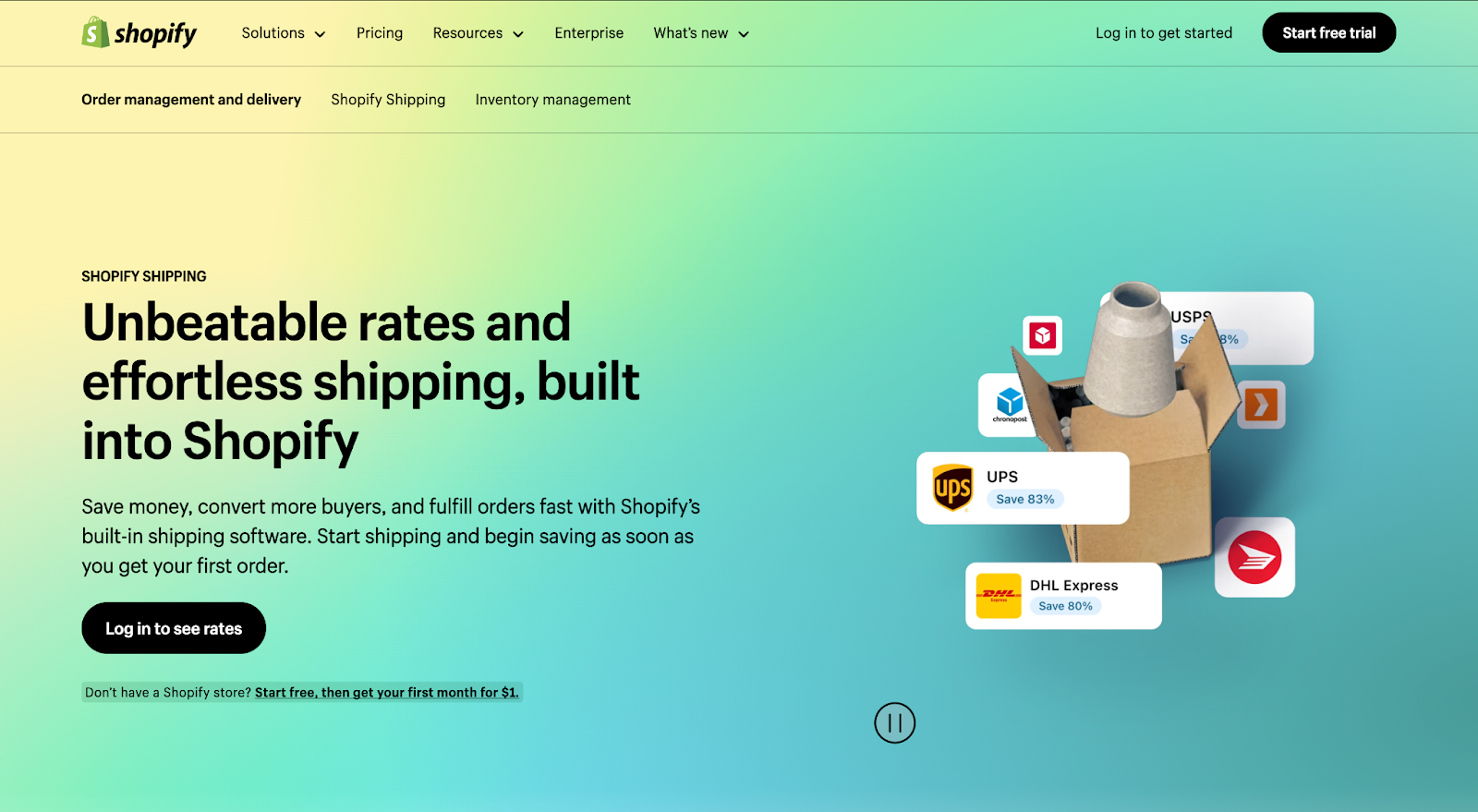
For more complex logistics, like freight shipping or unique delivery options, you can connect third-party integrations.
Does Shopify work for in-person sales?
If you also sell in-person, Shopify has you covered with its Point of Sale (POS) system.
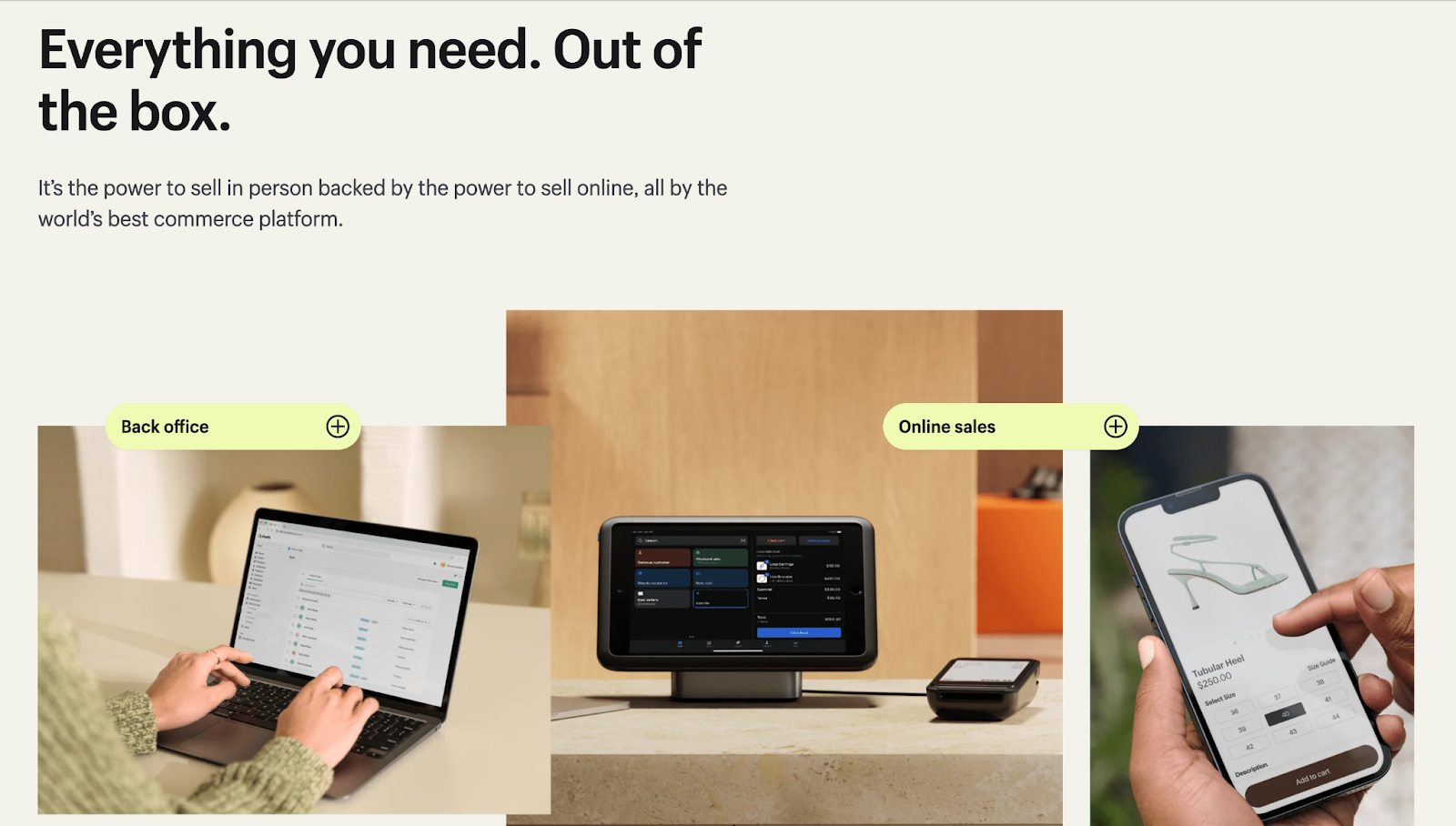
This feature syncs your inventory across online and physical locations. It supports local pickups, returns, and gift cards, making it great for small businesses with a storefront. The hardware, like card readers and barcode scanners, is easy to use.
So, is Shopify a good choice for physical products?
Shopify’s strengths make it a reliable platform for physical product sellers, from new business owners to growing brands. The inventory, shipping, and in-person selling tools simplify operations, while its integrations help your store grow.
As with any platform, it’s worth mapping out your needs before you commit, so you can choose the plan and apps that suit your business.
Is Shopify worth it for digital products?
Shopify lets you sell digital products to customers worldwide, alongside or instead of physical goods.
What features exist for selling digital products?
Shopify supports selling digital goods through the Digital Downloads app. The app is free, handles files up to 5GB, and delivers products automatically. You can also bundle physical and digital items—like offering an MP3 with a vinyl record—to increase your average order value.
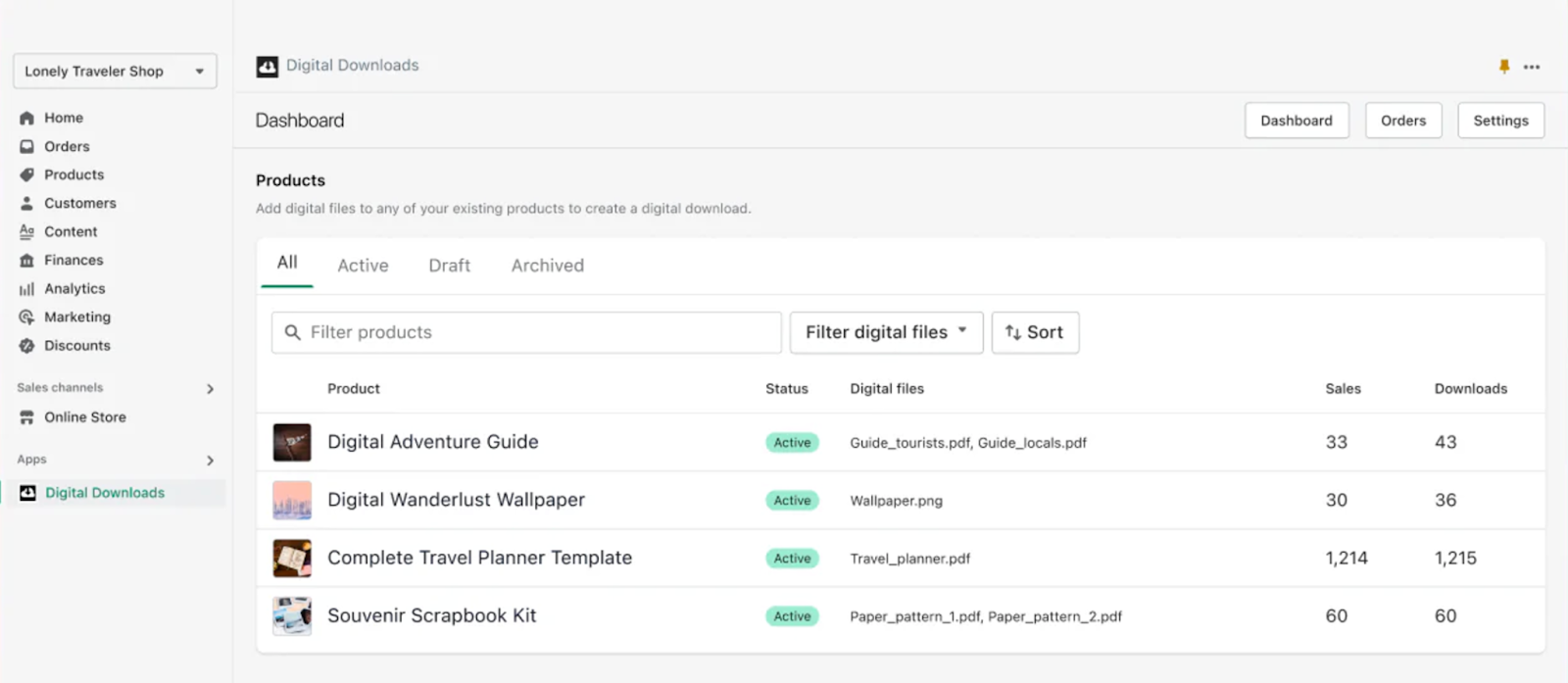
Shopify’s SEO tools and marketing integrations (like email campaigns and social selling) help promote your products effectively. Plus, its multi-channel selling options mean you can list your digital products on social platforms like Facebook or Instagram.
If you need more advanced features, such as letting customers personalize their order, adding extra file protection, or delivering files larger than 5GB, you can add apps from the App Store or use external storage.
Is Shopify worth it for dropshipping?
If you’re considering Shopify for dropshipping, it’s likely because of its reputation for ease of use and automation tools. But whether it’s worth it depends on your goals, budget, and the effort you’re willing to put in.
What dropshipping apps are available?
Shopify integrates seamlessly with dropshipping apps like DSers, Spocket, and Zendrop. These tools connect you with thousands of suppliers and simplify managing products, processing orders, and tracking inventory.
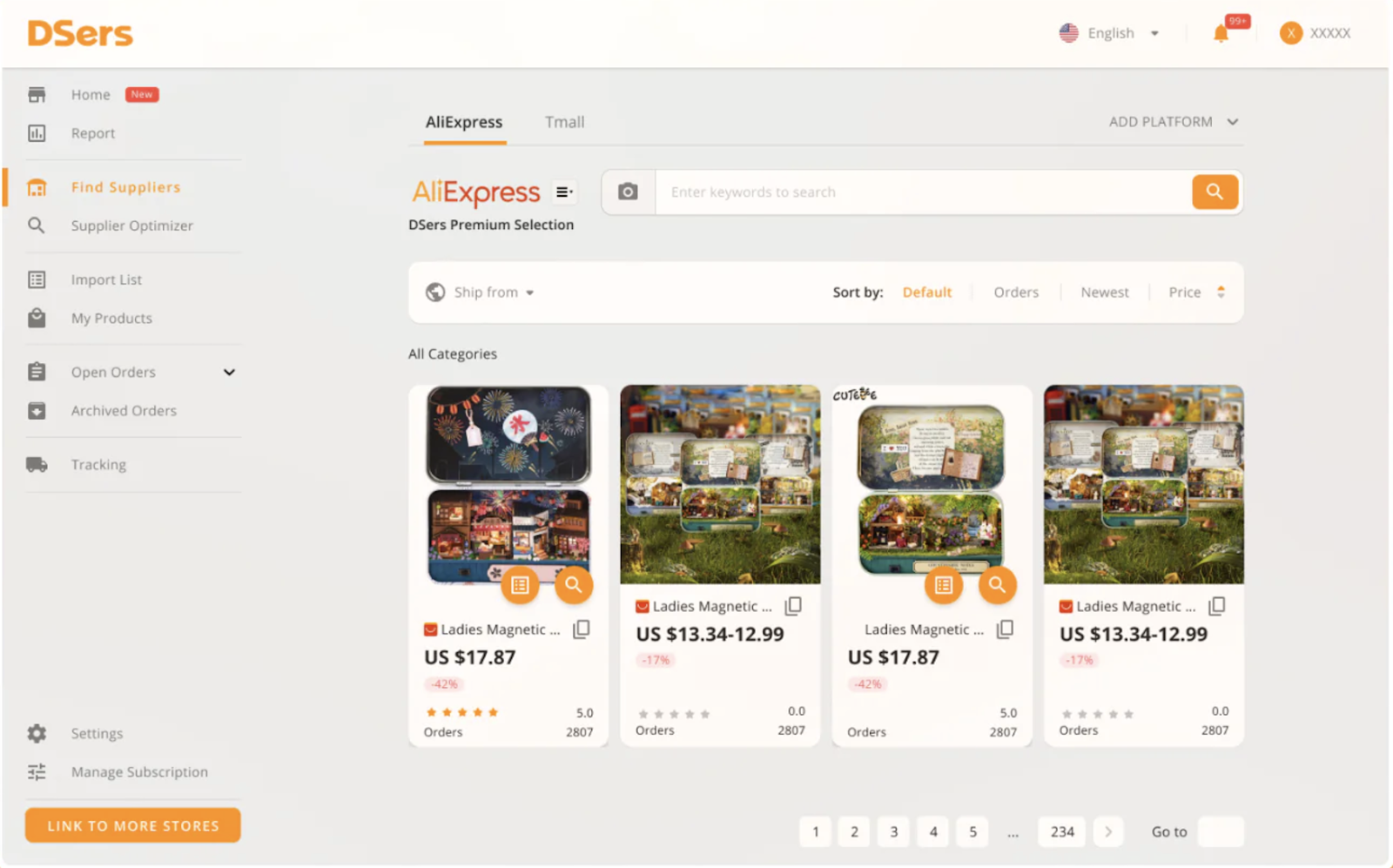
Before choosing a supplier, order samples to check quality and shipping times. If building a brand is important to you, look for suppliers that offer white-label products and custom packaging.
Some dropshipping apps charge monthly subscription fees, while others offer free plans, so be sure to factor any app costs into your initial budget.
If you're looking to start dropshipping, check out our beginner dropshipping guide.
What print on demand options do you get?
If you want to customize products like t-shirts, mugs, or posters, Shopify has plenty of print-on-demand apps like Printful and Printify. These let you sell personalized items without holding inventory, which is great for building a brand.
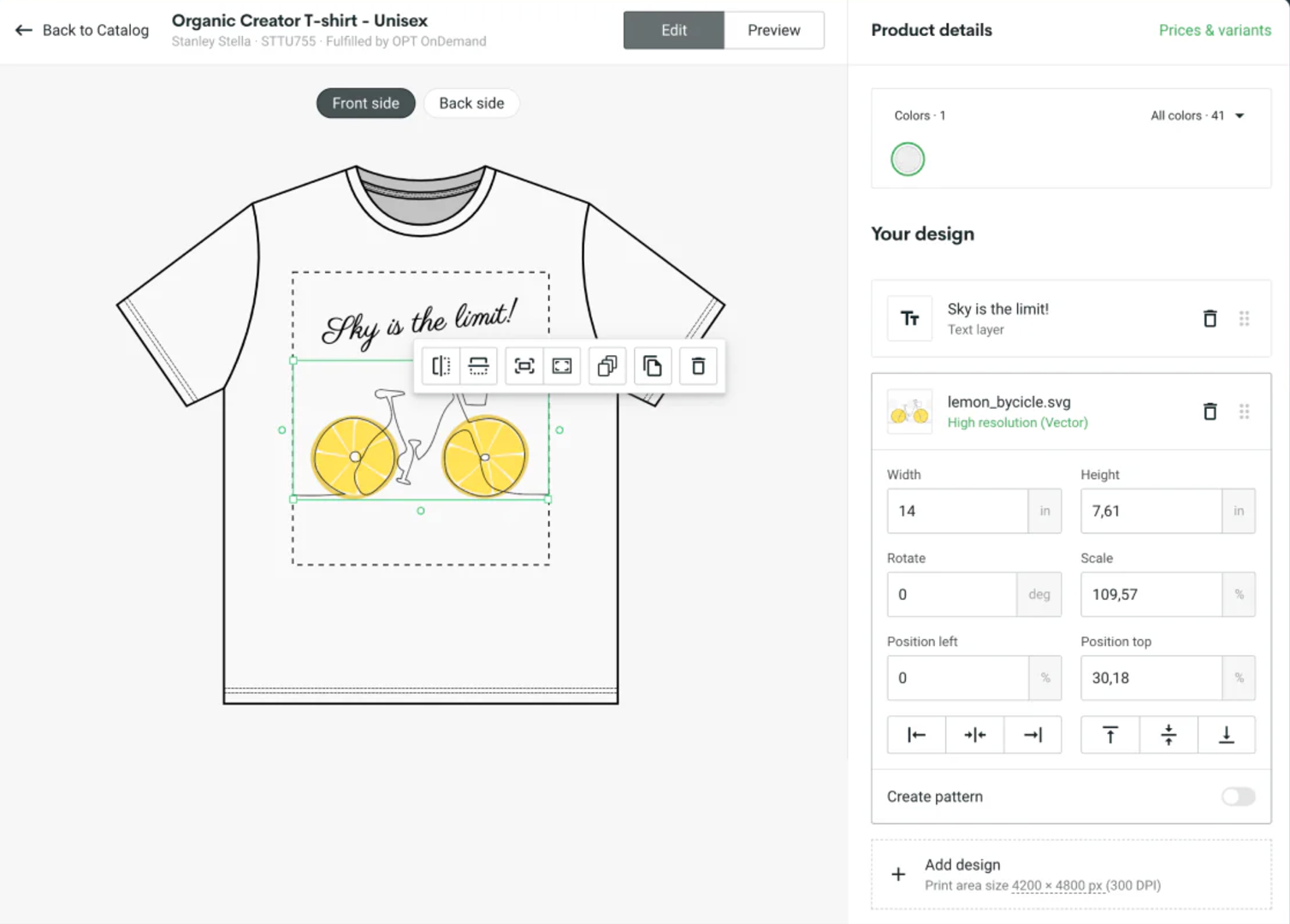
You can test different designs and products with minimal investment to see what your customers love. Start by ordering samples to check product quality and color accuracy before adding them to your store.
If you're interested to learn the ins-and-outs of this business model, don't miss our guide on how to start a print on demand business.
What are the startup costs?
As we discussed earlier, Shopify plans start at $29/month (billed annually), and Shopify Payments card rates start at 2.9% plus 30 cents per sale. You may also want to budget for apps that add features like product reviews, upsells, or email marketing.
Keep in mind that when you make a dropshipping sale, your supplier or production partner will bill you regardless of when and how you collect payment from the customer. It’s a good idea to keep some capital set aside to cover these costs.
Advertising, like Facebook or Google ads, is another expense you should budget for. If you're working with a tight budget, these costs might seem overwhelming. But if you're willing to invest in learning and testing, Shopify provides the tools you need to grow your business.
Is dropshipping with Shopify worth it?
Like any business model, dropshipping with Shopify doesn’t automatically guarantee success. The platform provides the tools you need, but success ultimately depends on how you use them, including testing products, refining your approach, and investing in building a brand.
Successful Shopify stores focus on solving customer problems or tapping into trends. They prioritize quality products, effective marketing, and a strong customer experience. If you’re willing to follow these steps, you’ll have a better chance of turning your store into a thriving business.
Overall, I’d say Shopify is worth it for dropshipping if you’re ready to invest time and effort. It’s not a quick win, but the platform provides powerful tools and integrations to help you build and grow your business.
What about service-based businesses?
If dropshipping isn’t your thing and you’re running a service-based business, you might wonder: can Shopify handle services as well as products? The answer is yes, but there are some things to ponder.
How will your service fit into Shopify's platform?
Shopify is built around products, so you’ll set up your service as a 'product' and turn off shipping requirements in its settings.
For things like custom service requests or dynamic pricing, you can add third-party apps from the App Store.
How do you handle bookings and scheduling?
For bookings and scheduling, you can use third-party apps like Tipo Appointment Booking. These let you create appointment slots, send reminders, and manage bookings directly from your store.
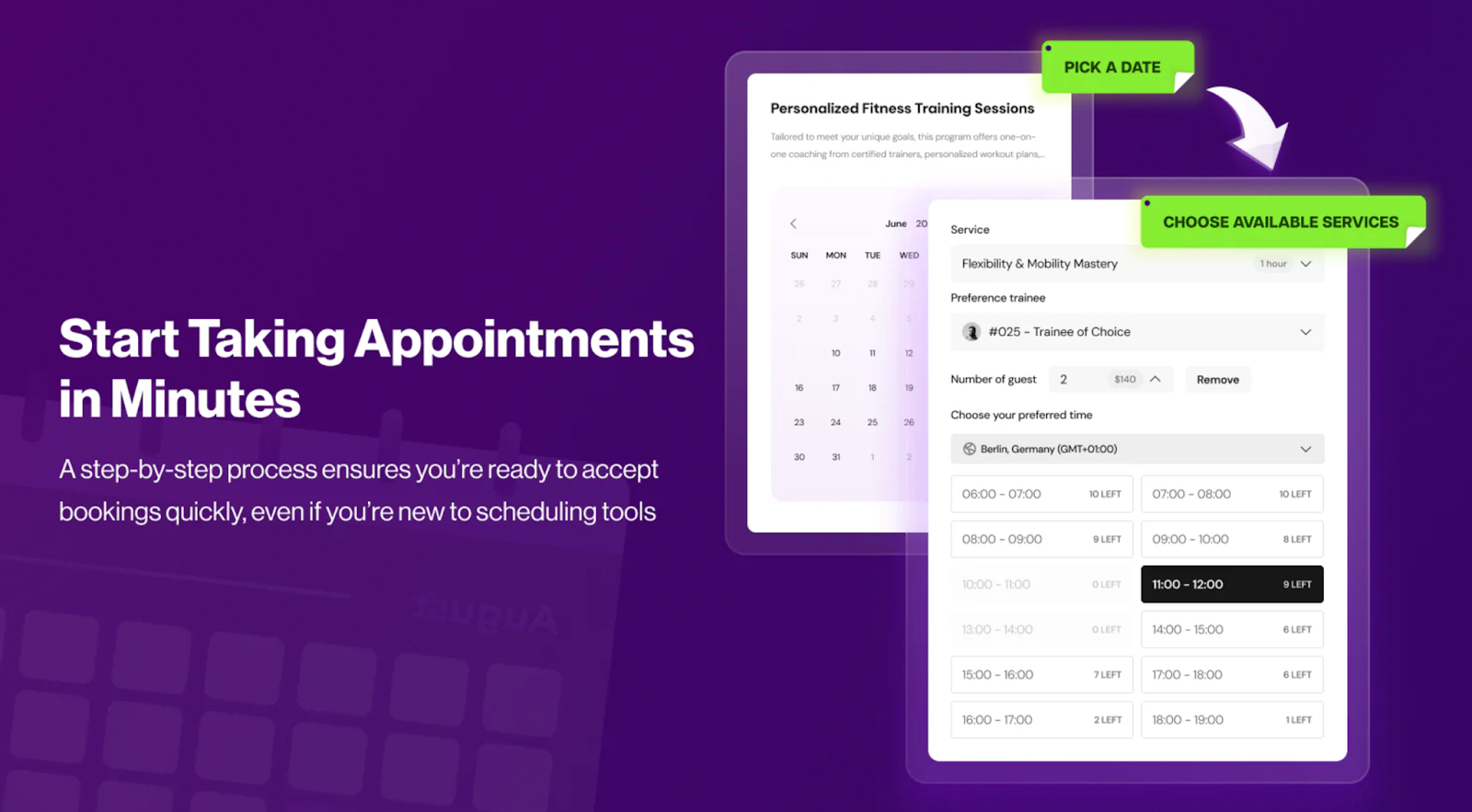
For businesses offering multiple options, like 30-minute or 60-minute sessions with tiered pricing, these apps do the job. Advanced features, like syncing with external calendars or handling multiple services, are typically available on paid plans.
What marketing tools do you get?
Shopify equips service providers with a variety of marketing tools to help you reach your audience. Built-in features like email campaigns, SEO optimization, and discount codes make it easy to attract and retain clients. Plus, Shopify lets you connect directly to platforms like Facebook and Instagram to promote services and run ads.
Shopify also offers:
- Email automation: Apps like Klaviyo can send personalized reminders or follow-ups after bookings.
- Loyalty programs: Tools like Smile.io help retain clients by rewarding repeat bookings.
- Content marketing: Use Shopify’s blogging feature to share tips, updates, or case studies related to your services.
For service-specific needs, like managing appointments or customer-specific workflows, apps like Sesami can help.
How do payments work?
Shopify Payments makes handling basic transactions simple and reliable. If your service charges a flat fee—like a one-time consultation or a fixed package—this built-in processor gets the job done without extra hassle.
For businesses needing more flexibility, like taking deposits or offering installment payments, you can use Shop Pay Installments or apps like Partial.ly.
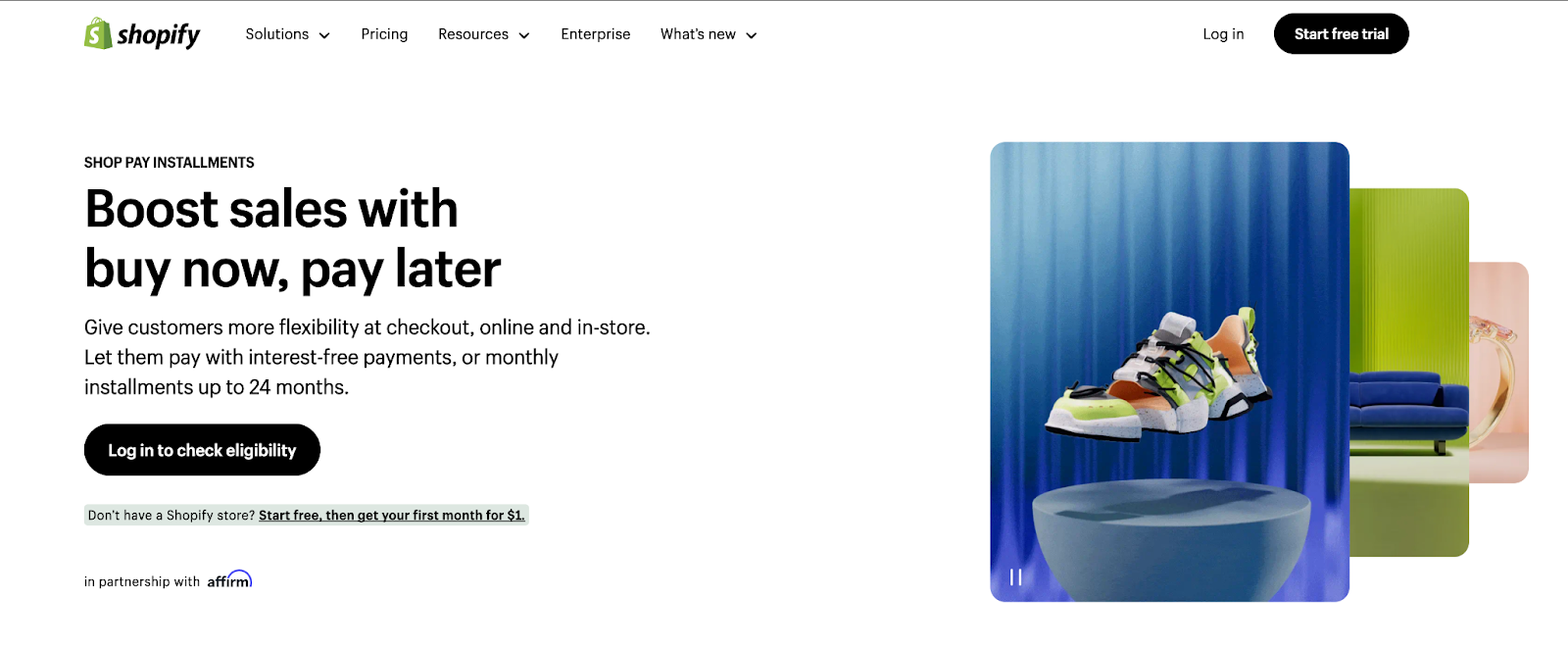
If you offer services with tiered pricing or custom packages, you can create variants for different pricing levels or use apps to support more complex setups.
In short, Shopify handles simple payment setups well, and apps let you extend it for more complex needs.
Can Shopify work for service-based businesses?
Absolutely. Businesses like Mannequin Madness and Novanym show that Shopify can support service-based businesses. It has the tools, the apps, and the flexibility you need to adapt to different models.
If your service relies on advanced booking systems or intricate pricing options, Shopify’s App Store has apps to help you build the setup you need.
Shopify’s core strengths and what to keep in mind
Shopify is a popular ecommerce platform, but like any tool, it has its strengths and things to keep in mind. Let’s explore both.
Shopify’s strengths
- User-friendly design
Even if you’re not tech-savvy, Shopify’s clean interface is easy to navigate. Plus, its templates look good out of the box. - Responsive themes
Shopify’s themes adapt well on phones, tablets, and desktops. Whether someone’s scrolling on their couch or shopping on the go, your store will look polished and professional. - Cart functionality
With abandoned cart recovery included in most plans, Shopify helps you win back shoppers who didn’t finish their purchase. This feature is often an extra charge on other platforms. - Dropshipping support
Shopify’s seamless integration with tools like Printful and DSers makes it a favorite for entrepreneurs diving into dropshipping or custom merchandise. - POS tools
Shopify POS lets you sell anywhere—in a retail store, at markets, or even pop-ups. You can track sales, manage inventory, and handle payments all from one system. - Multi-channel selling
Want to sell on Instagram, Facebook, or even Amazon? Shopify makes it simple to reach your audience wherever they are. - Global selling
If you’re thinking big, Shopify has your back with multi-currency support, language options, and tools to handle taxes and shipping internationally. - Tax automation
Shopify simplifies tax compliance with features like automatic tax calculations, including VAT MOSS for digital products. This can save you hours of admin work. - Scalable setup
Whether you’re starting small or running a growing business, Shopify can keep up. Its features work just as well for a side hustle as for a full-blown enterprise. - Secure platform
Shopify handles hosting, server maintenance, and security. With 99.99% uptime and PCI compliance, you won’t have to worry about downtime or data breaches.
What to keep in mind
- Customization
Shopify’s themes look great out of the box. For deeper customization, you can learn Shopify’s coding language, Liquid, or work with a Shopify Partner. - App costs
Some advanced features, like detailed analytics or extra shipping tools, come from apps. Many apps offer free plans, but it’s worth factoring paid apps into your budget. - Simple blog tools
Shopify’s blog covers the essentials. If content marketing is central to your strategy, you can extend it with apps from the App Store. - Migration
Moving a store between platforms takes some planning. Shopify offers import tools and apps, like Store Migration for Etsy sellers, and Shopify Partners can help with larger moves. - Support by plan
Shopify offers 24/7 live chat and email support, with phone support available on Plus.
Is Shopify better than other ecommerce platforms?
To really understand if Shopify is worth it for your specific needs, you’ll need to consider other platforms.
Shopify vs Wix, Squarespace, BigCommerce and WooCommerce
If you’re considering Shopify, chances are you’re also weighing it against other platforms like WooCommerce, BigCommerce, and Wix. Each has its strengths, but knowing how they compare on critical factors—like usability, scalability, and pricing—can help you decide.
Shopify vs WooCommerce
WooCommerce appeals to those who love customization and control. As a WordPress plugin, it’s free to start, but you’ll need hosting (around $15/month), plus costs for security, premium plugins, and regular maintenance. While WooCommerce gives you endless options to tweak your store, managing it all can feel like a part-time job—especially if you’re not tech-savvy.
Shopify, starting at $29/month (billed annually), simplifies the process. It’s designed to be user-friendly from day one, with hosting, security, and updates all included. You can set up a store in hours without touching a single line of code.
If you value ease and want to focus on selling, Shopify is often the better fit. For hands-on users who don’t mind managing the technical side, WooCommerce might be worth the effort.
Shopify vs BigCommerce
BigCommerce works well if you’re managing a large inventory or need features like bulk editing and selling on multiple platforms. Pricing starts at $39/month, but as your sales grow, so do the costs. The good news? There are no transaction fees, so you keep more of what you sell.
Shopify starts at $29/month (billed annually) but keeps pricing simple, no matter how much you sell. Just stick with Shopify Payments to avoid extra fees. What makes Shopify click for a lot of businesses is how easy it is to set up and use—it’s the kind of platform where you spend more time selling and less time troubleshooting.
If you like the idea of built-in features and don’t mind costs scaling with your sales, BigCommerce could fit. But for steady growth and fewer surprises, Shopify makes a strong case.
Shopify vs Squarespace
Squarespace works well if you want a beautiful website with some ecommerce capabilities. Its templates are visually impressive, and plans start at $16/month (billed annually). To access better selling tools like Instagram integration or advanced discounts, you’ll need the $28/month Commerce Basic plan or higher.
Shopify, starting at $29/month (billed annually) for its Basic plan, focuses on ecommerce. It offers features like multi-channel selling and inventory tracking, making it a practical choice for businesses prioritizing sales. Using Shopify Payments means you won’t pay Shopify’s extra transaction fee, which applies when you use a third-party payment gateway.
If design is your top priority and you’re running a smaller shop, Squarespace works beautifully. But if you're ready to scale or need more robust ecommerce tools, Shopify handles the heavy lifting.
If you're curious to learn more about these two platforms going head-to-head, take a look at our full breakdown of Shopify vs Squarespace.
Shopify vs Wix
Wix works well if you want a visually appealing website without much hassle. Its drag-and-drop editor is easy to use, and ecommerce plans start at $29/month. It’s a good fit for small businesses or those who focus on design rather than complex online store features. But if you need tools for managing a growing inventory or expanding your business, it can feel limiting.
Shopify, starting at $29/month (billed annually), offers robust ecommerce features like payment processing and inventory management. While Wix leans toward creative flexibility, Shopify is built for businesses focused on selling and scaling.
For light ecommerce or creative sites, Wix fits the bill. For more serious selling, Shopify offers the tools to get the job done.
Shopify vs marketplaces
After reviewing Shopify alongside other ecommerce platforms, let's see how it measures up against marketplaces like Amazon and Etsy. These platforms connect you with large audiences but come with their own trade-offs. Here's how they compare:
Shopify vs Amazon
Amazon puts your products in front of millions of shoppers ready to buy. The platform’s trusted reputation and simple setup make it easy to get started. Amazon’s fulfillment service—called FBA—handles storage, shipping, and returns, making logistics a breeze.
But Amazon takes a significant cut, including a 15% commission and FBA fees. Your branding is limited to product pages, and you can’t access customer data for marketing.
With Shopify, you create your own store, control your branding, and own your customer relationships. While it takes more effort upfront, Shopify’s freedom and lower fees make it the better choice for long-term growth.
Shopify vs Etsy
Etsy helps you sell handmade and unique products to millions of buyers. Setting up is simple and you can start selling quickly.
The platform charges 6.5% transaction fees, 20 cents per listing, and 3% payment processing fees—costs that grow with your sales. You also can't customize your shop much since every store uses Etsy's standard design.
Shopify gives you an independent online store. Design your own website, set your own prices, and build an email list of customers. While you'll pay a monthly fee and need to market your store, you avoid listing fees and keep more profit per sale.
Check out our full comparison of Shopify vs Etsy.
Shopify vs eBay
eBay is ideal for selling secondhand items, collectibles, or anything with a niche audience. The auction format can create excitement and help you move inventory quickly. Plus, it’s simple to list products and reach buyers globally.
But branding isn’t an option on eBay. You’re just another seller in their marketplace, and fees can reach 12-15% per sale. It’s harder to scale when you don’t own your customer relationships.
With Shopify, you create your own space. There are no listing fees, and you can tailor everything to reflect your brand. While it’s more work upfront, it’s a better choice if you want to grow a business on your terms.
What you need to succeed
Starting a Shopify store is exciting, but success means going beyond the basics. Let’s talk about what it takes to make your business thrive.
Basic know-how
Before creating a new store on Shopify, it helps to get familiar with the platform. The Shopify Help Center is loaded with step-by-step guides for tasks like adding products and setting up shipping.
A great way to learn? Create a demo store and explore the features firsthand. It’s a no-pressure way to understand how everything works before you go live.
Time investment
Running a Shopify store requires time, especially in the beginning. Plan on dedicating 15-20 hours a week to tasks like managing inventory, responding to customers, and fine-tuning your marketing. Successful store owners often check in daily, even if it’s just for a quick update.
Essential skills
Beyond the basics, success with Shopify often comes down to the skills you bring to the table. Whether you’re handling everything yourself or delegating parts of the work, these skills will make a noticeable difference in how smoothly your store operates.
- Website building and design: Knowing how to tweak your site’s design for a professional and user-friendly look can boost customer confidence.
- Customer communication: Responding quickly and effectively to customer inquiries helps build trust and loyalty.
- Photo editing: Great product images sell. Basic photo editing skills can help you showcase your products in the best light.
- Marketing: Understanding your target audience and running effective campaigns—whether through email, social media, or ads—drives traffic and sales.
- Analytics and reporting: Knowing how to interpret data (like conversion rates or ad performance) helps you make smarter business decisions.
These skills don’t have to be mastered overnight, but the more you develop them, the better positioned you’ll be to grow your business.
Cross-border knowledge
Selling internationally is a fantastic way to grow your business, but it takes some preparation. Shopify supports multiple currencies and languages, but understanding shipping costs, import duties, and local tax regulations is crucial.
For instance, if you’re shipping to Europe, check whether VAT applies to your products. Shopify’s international selling guides are a lifesaver here—they’ll help you navigate these details so you can avoid surprises later.
So, should you choose Shopify?
Deciding whether Shopify is worth it comes down to your unique business goals and needs. Start by considering your business type: Shopify works exceptionally well for physical products, and it also offers tools for dropshipping, digital goods, and services.
You should also plan your budget. Alongside your plan, factor in any apps, themes, or professional design and development services you might need.
Think about your technical skills, too. Shopify’s intuitive interface is beginner-friendly, and as your business grows, you can unlock more of its potential by learning the platform or working with a Shopify Partner.
If you’re ready to move forward, take the next step by signing up for a free Shopify trial to test its tools. Whether you’re starting from scratch or scaling an existing business, Shopify could be the key to bringing your vision to life.
Build your business with Whop
Shopify is a great platform for building an online store, with the tools and ecosystem to support you from your first sale to global scale. Whop is another excellent option, built for launching and running your entire business in one place.
With Whop, you can set up your store, accept payments from customers, and manage payouts, all from a single dashboard.
Don't want to start from scratch? With Whop Blueprints, you can copy a business that’s already up and running on Whop, then adapt it to suit your own idea, so you’re never starting from a blank page. Already have a website? Move it to Whop with Whop Migrations.
And once you’re live, you don’t have to do everything by hand. The Whop CLI lets you run your business agentically, straight from the terminal.
Signing up is free, so you can start building today.









![Mighty Networks: is it the best choice for your community? [2026 review]](https://storage.ghost.io/c/12/7b/127b828b-bdc2-4972-9cf2-de857df9c324/content/images/size/w1000/format/webp/2024/05/What-is-Mighty-Networks-Features--Pricing--and-Alternatives-2024-Review.webp)

![The best online newsletter platforms [2026]](https://storage.ghost.io/c/12/7b/127b828b-bdc2-4972-9cf2-de857df9c324/content/images/size/w1000/format/webp/2024/05/Best-online-newsletter-platforms.webp)
![Top 17 best online course platforms to sell your course [2026]](https://storage.ghost.io/c/12/7b/127b828b-bdc2-4972-9cf2-de857df9c324/content/images/size/w1000/format/webp/2026/01/best-online-course-platforms_1x.webp)